Guides

Do I need technical skills to make a website?
Do you need to be a computer whiz to make a website? Nope, not at all!
Sure, if you want to get really technical, you could dive into stuff like HTML, CSS, and other coding languages. But don’t sweat it if that sounds like gibberish to you.
The cool thing is you’ve got options. One of the easiest ways is to use a website builder. Think of it like using Word or PowerPoint. Just drag, drop, and you’re pretty much good to go!
These easy-to-use platforms offer a visual drag and drop editor, web hosting, and can even provide a custom domain name: truly a one-stop-shop!
Let’s get started now, shall we? Just follow these simple steps, and you will make your own website in no time!
How to set up a website in 7 steps
From our research (and own experience) we’ve found that most website projects go through the following steps:
Publish and promote your website
A few important terms for absolute beginners
Domain name: that’s the web address of your website. For example: mygreatwebsite.com.
URL: includes the domain name and any subpages. For example: https://mygreatwebsite.com/about
CMS: short for Content Management System. A website building platform that you can use to create, upload and publish your website. For example: WordPress and Joomla.
Website Builder: a simplified version of a CMS, usually for smaller websites. It allows easy website editing and offers predefined designs for you to choose from. It also serves as your web hosting provider. Examples: Wix and Squarespace.
Web hosting provider: a place to which you can upload your website, so other people can view it. Examples: Bluehost and Siteground.
Responsive web design: there are many different screen sizes these days (desktop computers, smartphones etc.). Responsive website templates adapt to the screen automatically and rearrange the content, so it’s readable without any issues.
Website template: website builders come with pre-designed website themes and page templates. You pick the one that’s closest to your idea or industry and adapt it to your liking (e.g. by changing images, texts, headlines etc.) when building your website.
SEO: short for Search Engine Optimization. If done right, your website will rank at the top of search engines like Google for relevant search terms. This will attract organic website visitors, which, opposed to paid traffic (e.g. via Google Ads), is completely free.
1. Identify the type of website you want to create
Websites come in all shapes and sizes. Here are the most common ones:
Type 1: Very small websites
An example of a very small website would be an online portfolio (find some examples here) or resume. These are typically used by copywriters, translators, or illustrators to showcase their work, contact information and an ‘about us’ page.
Usually these websites have around seven pages or less. It could even be a one-pager website, where you display all the information on a single page.
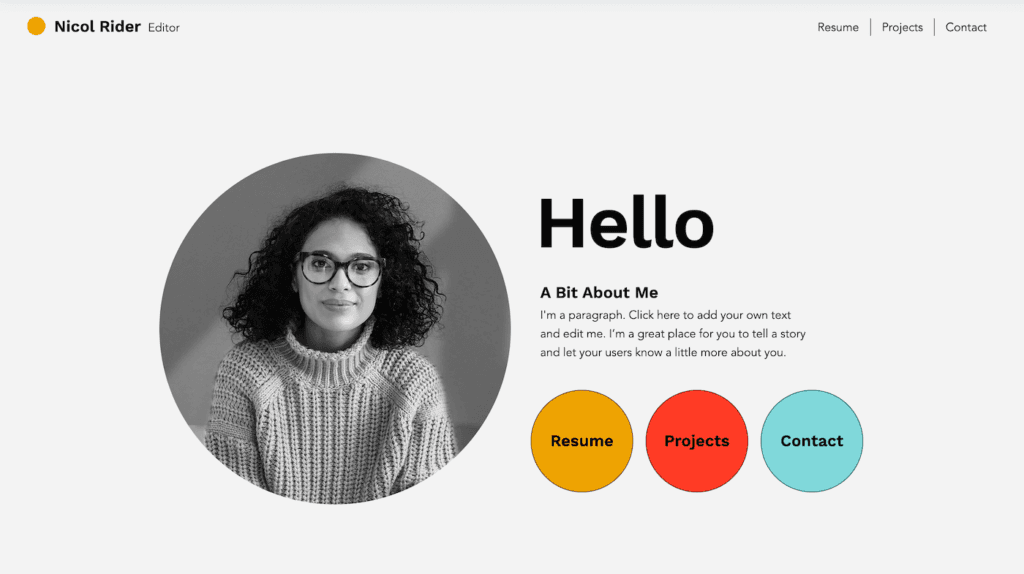
Online Portfolio template by Wix (‘Creative CV’)
This type of website doesn’t get updated much and is mostly static. You create it once, make sure everything works as it should, test the mobile version and then let it sit there. Traffic comes mostly from people directly typing in the URL or from local directories like Google Maps.
Time required: Setting up such a small website usually doesn’t take very long: a weekend should be enough for a decent-enough first version.
Ideal ways to create it: a website builder like Wix. For cheaper, slightly less powerful options, you can also check out Webnode and Strikingly.
Type 2: Blogs
If you like to share your thoughts frequently, you can also start a blog. This gives your visitors a reason to come back to your website and usually invites them to comment. Adding blog posts is usually done via a simple editor where you can upload text and images. A typical example would be a travel or food blog.
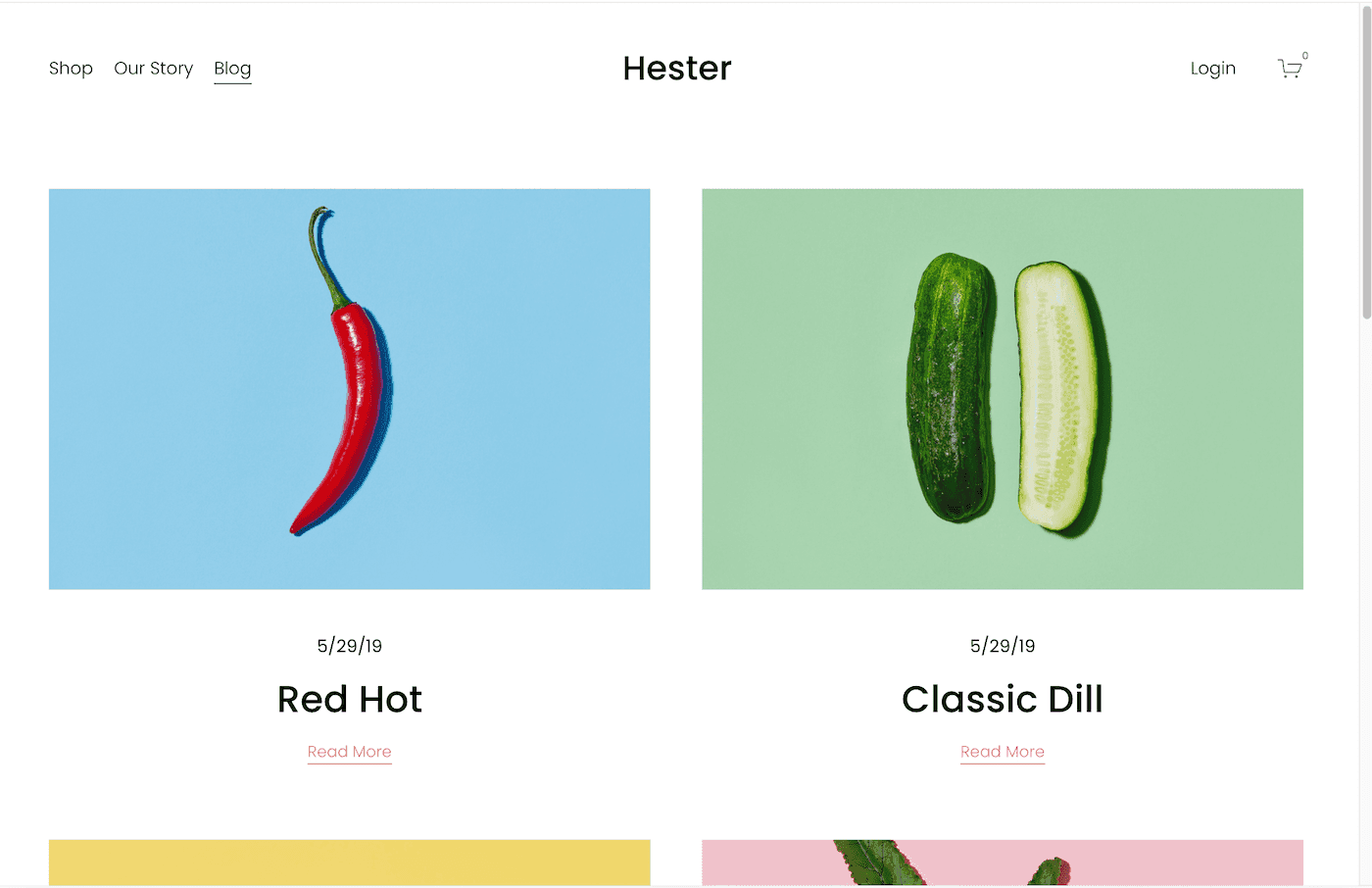
Squarespace blog template (‘Hester’)
A blog page can also be added to portfolio websites, but this has become less popular due to the rise of social media.
Time required: A small blog can easily be set up within a few days. The biggest time investment comes from posting regular content.
Ideal ways to create it: Squarespace or WordPress (there are even free blog makers)
Type 3: Slightly larger, business-focused websites
In this type of business, the website is usually an integral part of it, meaning that without the website, the business wouldn’t exit.

Shopify’s ‘Prestige’ Online Store Theme
The website might be the main marketing channel, for example:
A food delivery service
A membership program (e.g. online fitness course)
A booking website for a vacation rental home
Online consulting or coaching services
The website can even be the business:
An Online Store
A website comparing different products (like Tooltester.com)
An online education website
An online newspaper or magazine
Time required: It depends a lot on the design and functionality of your website. For example, using a website builder like Wix, you can create a site for your yoga business (incl. online appointments & payments) easily within a week, just using standard components.
However, if you want to build a bigger website with bespoke features and page templates, you will have to use a CMS like WordPress. Depending on your technical knowledge, we are now looking at a timeframe of at least a month. This will further increase if you need to hire a designer and programmer for certain tasks.
Ideal ways to create it: for regular (content)-websites, WordPress is usually a great solution. For online stores, Shopify or WooCommerce. But even Wix is worth checking out as they have many specialized apps for vacation rentals, restaurants, online bookings etc.
Smart Finder: Find your ideal website builder in 60 seconds
2. Decide on a platform and budget to build your website
After having identified the type of website you now have a clearer idea of the size of the project.
Let’s go over the most popular ways to start a professional website. There are many solutions, including website builders vs coding. Some are more flexible than others, and some are more complex.
Option 1: Setting up a website with a website builder
Let’s start with the easiest option: a website builder. This is an “all-inclusive” package, so to speak: A single platform will usually provide the following:
The template design
Drag and drop web editor
Web hosting
Domain name
Email address
Customer support
This isn’t only useful for beginners: it simply depends on the project. The good news is also that almost all site builders let you create a free basic website on a subdomain (e.g. yourname.sitebuildername.com). While I wouldn’t recommend using a free website professionally (since it’s ad-supported), it’s a perfect way to try it in detail before deciding if the cost is worth it.
Tip: For a simpler way to design your website, consider AI Website Builders. These tools generate custom websites with minimal input, streamlining your site’s creation. While they may not offer extensive customization, their efficiency often suffices for a swift launch.
However, if you want to take your business online, you should consider a paid plan. Prices start at around $8/month, but it includes all the essentials. Add around $1-6/month on top if you need a professional email address for your business website.
Let’s make this more concrete, though. This is how much you’d pay for an ad-free website with your own domain name:
Wix: $17/month (Light plan)
Squarespace: $16/month (Personal plan)
Hostinger Website Builder: $10.99/month (Website plan) – price goes up after your first payment term.
To better understand exactly how it works, please watch our step-by-step tutorial for website creation!
Pros:
It’s very easy to use.
You don’t need additional software or even a web host.
You can start without technical knowledge.
Updates and security aspects are handled by the website builder company.
Predefined themes that you can adapt as you like.
Mobile-optimized version included by default.
Cons:
You can’t always add extra features (depending on the website builder).
It isn’t as flexible since you’re dependent on the provider.
They aren’t designed for very complicated projects that require a database (e.g. a job board or real-estate directories)
The most popular website builders are Wix (see tutorial), Squarespace (see tutorial), and Shopify (for ecommerce stores). You’ll find other website builders in our complete comparison. You can also check out our guide to choosing a website builder.
You can try the Wix website builder for free and for as long as you want.

Do I need technical skills to make a website?
Do you need to be a computer whiz to make a website? Nope, not at all!
Sure, if you want to get really technical, you could dive into stuff like HTML, CSS, and other coding languages. But don’t sweat it if that sounds like gibberish to you.
The cool thing is you’ve got options. One of the easiest ways is to use a website builder. Think of it like using Word or PowerPoint. Just drag, drop, and you’re pretty much good to go!
These easy-to-use platforms offer a visual drag and drop editor, web hosting, and can even provide a custom domain name: truly a one-stop-shop!
Let’s get started now, shall we? Just follow these simple steps, and you will make your own website in no time!
Do I need technical skills to make a website?
Do you need to be a computer whiz to make a website? Nope, not at all!
Sure, if you want to get really technical, you could dive into stuff like HTML, CSS, and other coding languages. But don’t sweat it if that sounds like gibberish to you.
The cool thing is you’ve got options. One of the easiest ways is to use a website builder. Think of it like using Word or PowerPoint. Just drag, drop, and you’re pretty much good to go!
These easy-to-use platforms offer a visual drag and drop editor, web hosting, and can even provide a custom domain name: truly a one-stop-shop!
Let’s get started now, shall we? Just follow these simple steps, and you will make your own website in no time!
Do I need technical skills to make a website?
Do you need to be a computer whiz to make a website? Nope, not at all!
Sure, if you want to get really technical, you could dive into stuff like HTML, CSS, and other coding languages. But don’t sweat it if that sounds like gibberish to you.
The cool thing is you’ve got options. One of the easiest ways is to use a website builder. Think of it like using Word or PowerPoint. Just drag, drop, and you’re pretty much good to go!
These easy-to-use platforms offer a visual drag and drop editor, web hosting, and can even provide a custom domain name: truly a one-stop-shop!
Let’s get started now, shall we? Just follow these simple steps, and you will make your own website in no time!
Do I need technical skills to make a website?
Do you need to be a computer whiz to make a website? Nope, not at all!
Sure, if you want to get really technical, you could dive into stuff like HTML, CSS, and other coding languages. But don’t sweat it if that sounds like gibberish to you.
The cool thing is you’ve got options. One of the easiest ways is to use a website builder. Think of it like using Word or PowerPoint. Just drag, drop, and you’re pretty much good to go!
These easy-to-use platforms offer a visual drag and drop editor, web hosting, and can even provide a custom domain name: truly a one-stop-shop!
Let’s get started now, shall we? Just follow these simple steps, and you will make your own website in no time!
Do I need technical skills to make a website?
Do you need to be a computer whiz to make a website? Nope, not at all!
Sure, if you want to get really technical, you could dive into stuff like HTML, CSS, and other coding languages. But don’t sweat it if that sounds like gibberish to you.
The cool thing is you’ve got options. One of the easiest ways is to use a website builder. Think of it like using Word or PowerPoint. Just drag, drop, and you’re pretty much good to go!
These easy-to-use platforms offer a visual drag and drop editor, web hosting, and can even provide a custom domain name: truly a one-stop-shop!
Let’s get started now, shall we? Just follow these simple steps, and you will make your own website in no time!
Do I need technical skills to make a website?
Do you need to be a computer whiz to make a website? Nope, not at all!
Sure, if you want to get really technical, you could dive into stuff like HTML, CSS, and other coding languages. But don’t sweat it if that sounds like gibberish to you.
The cool thing is you’ve got options. One of the easiest ways is to use a website builder. Think of it like using Word or PowerPoint. Just drag, drop, and you’re pretty much good to go!
These easy-to-use platforms offer a visual drag and drop editor, web hosting, and can even provide a custom domain name: truly a one-stop-shop!
Let’s get started now, shall we? Just follow these simple steps, and you will make your own website in no time!
Do I need technical skills to make a website?
Do you need to be a computer whiz to make a website? Nope, not at all!
Sure, if you want to get really technical, you could dive into stuff like HTML, CSS, and other coding languages. But don’t sweat it if that sounds like gibberish to you.
The cool thing is you’ve got options. One of the easiest ways is to use a website builder. Think of it like using Word or PowerPoint. Just drag, drop, and you’re pretty much good to go!
These easy-to-use platforms offer a visual drag and drop editor, web hosting, and can even provide a custom domain name: truly a one-stop-shop!
Let’s get started now, shall we? Just follow these simple steps, and you will make your own website in no time!
Do I need technical skills to make a website?
Do you need to be a computer whiz to make a website? Nope, not at all!
Sure, if you want to get really technical, you could dive into stuff like HTML, CSS, and other coding languages. But don’t sweat it if that sounds like gibberish to you.
The cool thing is you’ve got options. One of the easiest ways is to use a website builder. Think of it like using Word or PowerPoint. Just drag, drop, and you’re pretty much good to go!
These easy-to-use platforms offer a visual drag and drop editor, web hosting, and can even provide a custom domain name: truly a one-stop-shop!
Let’s get started now, shall we? Just follow these simple steps, and you will make your own website in no time!
Do I need technical skills to make a website?
Do you need to be a computer whiz to make a website? Nope, not at all!
Sure, if you want to get really technical, you could dive into stuff like HTML, CSS, and other coding languages. But don’t sweat it if that sounds like gibberish to you.
The cool thing is you’ve got options. One of the easiest ways is to use a website builder. Think of it like using Word or PowerPoint. Just drag, drop, and you’re pretty much good to go!
These easy-to-use platforms offer a visual drag and drop editor, web hosting, and can even provide a custom domain name: truly a one-stop-shop!
Let’s get started now, shall we? Just follow these simple steps, and you will make your own website in no time!
Do I need technical skills to make a website?
Do you need to be a computer whiz to make a website? Nope, not at all!
Sure, if you want to get really technical, you could dive into stuff like HTML, CSS, and other coding languages. But don’t sweat it if that sounds like gibberish to you.
The cool thing is you’ve got options. One of the easiest ways is to use a website builder. Think of it like using Word or PowerPoint. Just drag, drop, and you’re pretty much good to go!
These easy-to-use platforms offer a visual drag and drop editor, web hosting, and can even provide a custom domain name: truly a one-stop-shop!
Let’s get started now, shall we? Just follow these simple steps, and you will make your own website in no time!
Do I need technical skills to make a website?
Do you need to be a computer whiz to make a website? Nope, not at all!
Sure, if you want to get really technical, you could dive into stuff like HTML, CSS, and other coding languages. But don’t sweat it if that sounds like gibberish to you.
The cool thing is you’ve got options. One of the easiest ways is to use a website builder. Think of it like using Word or PowerPoint. Just drag, drop, and you’re pretty much good to go!
These easy-to-use platforms offer a visual drag and drop editor, web hosting, and can even provide a custom domain name: truly a one-stop-shop!
Let’s get started now, shall we? Just follow these simple steps, and you will make your own website in no time!
Do I need technical skills to make a website?
Do you need to be a computer whiz to make a website? Nope, not at all!
Sure, if you want to get really technical, you could dive into stuff like HTML, CSS, and other coding languages. But don’t sweat it if that sounds like gibberish to you.
The cool thing is you’ve got options. One of the easiest ways is to use a website builder. Think of it like using Word or PowerPoint. Just drag, drop, and you’re pretty much good to go!
These easy-to-use platforms offer a visual drag and drop editor, web hosting, and can even provide a custom domain name: truly a one-stop-shop!
Let’s get started now, shall we? Just follow these simple steps, and you will make your own website in no time!
Do I need technical skills to make a website?
Do you need to be a computer whiz to make a website? Nope, not at all!
Sure, if you want to get really technical, you could dive into stuff like HTML, CSS, and other coding languages. But don’t sweat it if that sounds like gibberish to you.
The cool thing is you’ve got options. One of the easiest ways is to use a website builder. Think of it like using Word or PowerPoint. Just drag, drop, and you’re pretty much good to go!
These easy-to-use platforms offer a visual drag and drop editor, web hosting, and can even provide a custom domain name: truly a one-stop-shop!
Let’s get started now, shall we? Just follow these simple steps, and you will make your own website in no time!
Do I need technical skills to make a website?
Do you need to be a computer whiz to make a website? Nope, not at all!
Sure, if you want to get really technical, you could dive into stuff like HTML, CSS, and other coding languages. But don’t sweat it if that sounds like gibberish to you.
The cool thing is you’ve got options. One of the easiest ways is to use a website builder. Think of it like using Word or PowerPoint. Just drag, drop, and you’re pretty much good to go!
These easy-to-use platforms offer a visual drag and drop editor, web hosting, and can even provide a custom domain name: truly a one-stop-shop!
Let’s get started now, shall we? Just follow these simple steps, and you will make your own website in no time!
Do I need technical skills to make a website?
Do you need to be a computer whiz to make a website? Nope, not at all!
Sure, if you want to get really technical, you could dive into stuff like HTML, CSS, and other coding languages. But don’t sweat it if that sounds like gibberish to you.
The cool thing is you’ve got options. One of the easiest ways is to use a website builder. Think of it like using Word or PowerPoint. Just drag, drop, and you’re pretty much good to go!
These easy-to-use platforms offer a visual drag and drop editor, web hosting, and can even provide a custom domain name: truly a one-stop-shop!
Let’s get started now, shall we? Just follow these simple steps, and you will make your own website in no time!