
4.2
Very Good
The Best
Flexibility
Performance
The Worst
Support
Not the easiest to use
Starting From
$10 / month
Cloudways Review
There are just so many hosting options available these days that finding the right one can be a bit of a chore.
Well, don’t expect things to get any easier with Cloudways!
Why, you ask? Because this managed cloud hosting platform also lets you choose between 5 different data center providers.
Each of these providers has at least 10 different plans. And, you can even decide to pay monthly, or hourly. So that’s more than 100+ options to choose from!
For some, it will be a minefield. For others, it’s a great benefit to be able to pick exactly the features they need, like at a web hosting buffet.
So let’s dive in with this review to see who should use Cloudways and who should look elsewhere.
Cloudways PricesCloudways Prices
Ok, as mentioned above, the first thing to understand about Cloudways is that you can choose between the five different data center providers: DigitalOcean (which we used for our tests), Linode, Vultr, AWS (from Amazon), and Google Cloud.
Every provider has a minimum of 10 plans, but for simplicity’s sake, I’ll only mention the four key featured plans from each provider. Let’s call them Entry, Standard, Advanced and Pro to make things easier. This is what it looks like in table form:
Server | Entry | Standard | Advanced | Pro |
|---|---|---|---|---|
Digital Ocean | $10 / month 1GB RAM 1 Core Processor 25GB Storage 1TB Bandwidth | $22 / month 2GB RAM 1 Core Processor 50GB Storage 2TB Bandwidth | $42 / month 4GB RAM 2 Core processor 80GB Storage 4TB Bandwidth | $80 / month 8GB RAM 4 Core processor 160GB Storage 5TB Bandwidth |
Linode | $12 / month 1GB RAM 1 Core Processor 25GB Storage 1TB Bandwidth | $24 / month 2GB RAM 1 Core Processor 50GB Storage 2TB Bandwidth | $50 / month 4GB RAM 2 Core processor 80GB Storage 4TB Bandwidth | $90 / month 8GB RAM 4 Core processor 160GB Storage 5TB Bandwidth |
Vultr | $11 / month 1GB RAM 1 Core Processor 25GB Storage 1TB Bandwidth | $23 / month 2GB RAM 1 Core Processor 55GB Storage 2TB Bandwidth | $44 / month 4GB RAM 2 Core Processor 80GB Storage 3TB Bandwidth | $84 / month 8GB RAM 4 Core Processor 160GB Storage 4TB Bandwidth |
AWS | $36.51 / month 1.75GB RAM 1 vCPU 20GB Storage 2GB Bandwidth | $86.77 / month 3.75GB RAM 1 vCPU 20GB Storage 2GB Bandwidth | $176.26 / month 8GB RAM 2 vCPU 20GB Storage 2GB Bandwidth | $274.33 / month 16GB RAM 4 vCPU 20GB Storage 2GB Bandwidth |
Google Cloud | $33.18 / month 1.70GB RAM 1 vCPU 20GB Storage 2GB Bandwidth | $73.50 / month 3.75GB RAM 1 vCPU 20GB Storage 2GB Bandwidth | $138.52 / month 7.5GB RAM 2 vCPU 20GB Storage 2GB Bandwidth | $225.93 / month 15GB RAM 4 vCPU 20GB Storage 2GB Bandwidth |
Then, don’t forget that you can always go up one level. For instance, with Google Cloud, you can go up to $1332.65 per month. This would give you an insanely performant 120GB of RAM and 32 vCPUs.
(Vultr also has special High Frequency plans, which are slightly more expensive than the ones listed above, but give you extra storage.)
Also, Cloudways is the only affordable hosting provider I know who lets you buy hosting on an hourly basis.
For instance, with DigitalOcean, the entry plan would be $0.0139 per hour; Standard is $0.0306 / hour; Advanced is $0.0583 per hour, and Pro is $0.1111 per hour.
This is obviously best for agencies and resellers that manage client websites, or website owners who know when traffic spikes are coming.
Now I know it’s a lot to take in, so the best place to compare all the prices is probably directly on the pricing page of the Cloudways website.
What can you expect from each Cloudways plan?
This is the nice thing about using Cloudways, they offer all the same features on all plans. So whether you use the cheapest Linode plan or the most expensive AWS, you will get:
24/7/365 Support
Free SSL
One free migration
Unlimited application installation
Team management
Dedicated firewalls
24/7 real-time monitoring
Automated backups
Staging environment
Optimized with advanced caches
Regular security patching
HTTP/2 enabled servers
SSH and SFTP access
And the main advantage, of course, is that you can use the services from multiple providers without being locked into a contract with them.
There’s just one extra thing worth mentioning about the individual server providers, and that’s the datacenter’s locations:
Server | North America | Europe | Asia | Australia | Central Asia | South America | Middle East |
|---|---|---|---|---|---|---|---|
DigitalOcean | Toronto San Francisco New York | London Amsterdam Frankfurt | Singapore | Bangalore | |||
Linode | Newark Dallas Toronto Fremont Atlanta | London Frankfurt | Singapore Tokyo | Sydney | Mumbai | ||
Vultr | Seattle Los Angeles Chicago Miami Silicon Valley Dallas Atlanta Toronto | London Paris Amsterdam Frankfurt | Tokyo Singapore | Sydney | |||
AWS | Northern Virginia Oregon Northern California Montreal Ohio | Frankfurt London Stockholm Ireland Paris Milan | Seoul Hong Kong Singapore Tokyo | Sydney | Mumbai | Sao Paulo | Bahrain |
Google Cloud | Iowa North Virginia North Carolina Oregon Montreal | London Frankfurt Netherlands Belgium Finland | Taiwan Singapore Tokyo Hong Kong | Sydney | Mumbai | Sao Paulo | |
More information | |||||||
This can be useful to know in advance if you plan on targeting certain specific markets worldwide. And as you can see, Amazon and Google, for instance, are the only one with data centers in South America.
Is Cloudways worth to use?
Cloudways Backups
The Backup section is easily accessible in the left menu of your main dashboard. As you can see, the main options are to do with the frequency of the backups. It’s nice that you can schedule the timing yourself.
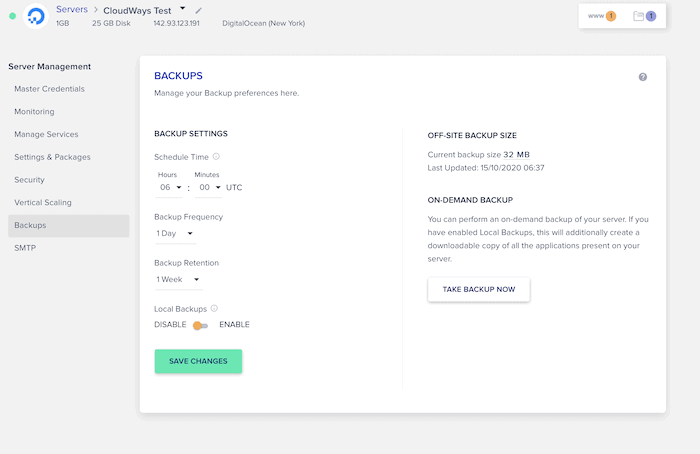
The local backup option lets you create one copy of your site. For some puzzling reason, Cloudways doesn’t let you download it directly from the dashboard – you’ll have to use SSH or SFTP to access it. And more importantly: it isn’t free. Cloudways charges $0.033 per GB of data that you backup offline.
Cloudways Vertical Scaling
One of the key benefits of having so many options is that you can scale your resources based on traffic spikes.
With Cloudways, this is done via what they call “vertical scaling”. You can increase your server size, but also CPU and memory, depending on the provider you have chosen.
It is a cost-effective solution, because you can keep all your data and web applications in one place, without having to migrate anything.
But there are a few things to note:
Storage scaling is permanent: so you won’t be able to scale back down if you only want to increase disk size. The workaround is to clone your server and move it to a scaled down plan, then cancel the upgraded one.
Scaling will take your server offline: make sure you do it during off-peak hours.
Different providers have different options: AWS and Google Cloud let you scale your server CPU and RAM independently. DigitalOcean, Linue and Vultr only let you scale the entire size of your server, including CPU, RAM and disk space.
Testing Cloudways’ hosting
As you can guess, measuring Cloudways’ performance is a bit tricky due to the number of server options. Still, this is what we found from our independent tests.
Uptime tests
We tested Cloudways’ (DigitalOcean server) uptime for the 12 months, we were very impressed with the results. As you can see in the chart below, those results of couldn’t be much better.
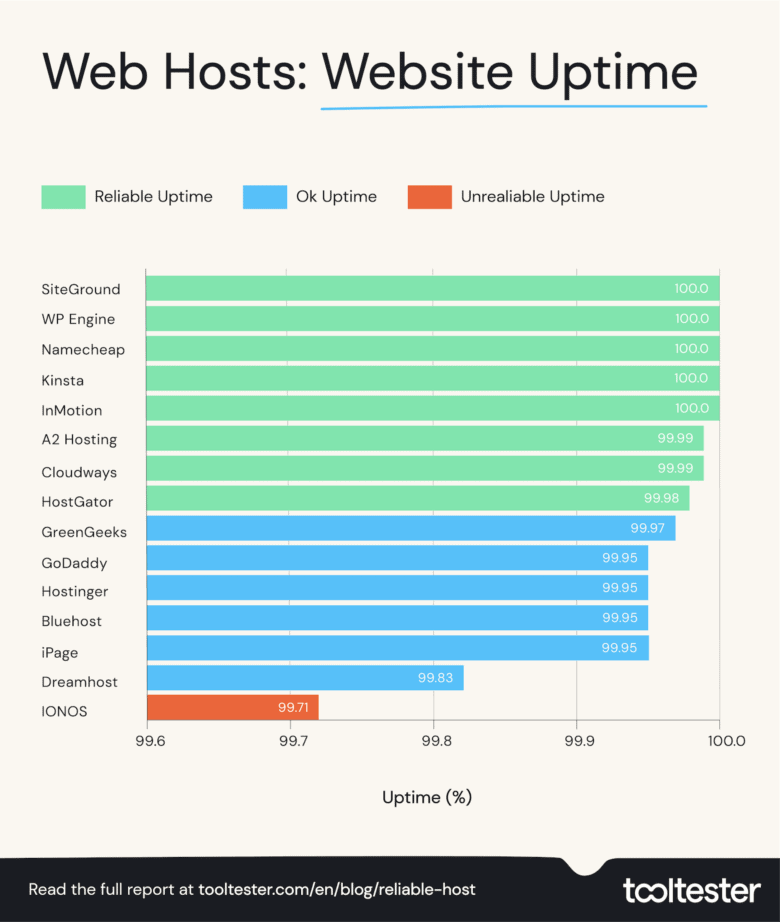
Compared to the last two years, there was a slight dip in performance this year, but 99.99% uptime is still very good:
2020 | 2021 | 2022 | |
|---|---|---|---|
Uptime % | |||
99.97 | 100 | 100 | |
99.99 | 99.99 | 100 | |
– | 100 | 100 | |
100 | 100 | 100 | |
99.73 | 99.95 | 100 | |
99.99 | 99.98 | 99.99 | |
100 | 100 | 99.99 | |
99.91 | 99.99 | 99.98 | |
99.98 | 99.98 | 99.97 | |
99.90 | 99.96 | 99.95 | |
99.48 | 99.92 | 99.95 | |
99.96 | 99.99 | 99.95 | |
98.45 | 99.85 | 99.95 | |
99.99 | 99.96 | 99.83 | |
– | 99.93 | 99.71 | |
To monitor uptime, I use StatusCake, a tool that checks each website every 5 minutes.
Note, however, that Cloudways doesn’t offer an uptime guarantee, unlike some of its competitors.
Is Cloudways fast?
Yes! Once again, note that we’ve only used the DigitalOcean data centers, but according to our series of independent tests, the average page loading speed was very good indeed.
With an average page load time of just 1.46 seconds, Cloudways was the one of the fastest web hosts we tested.
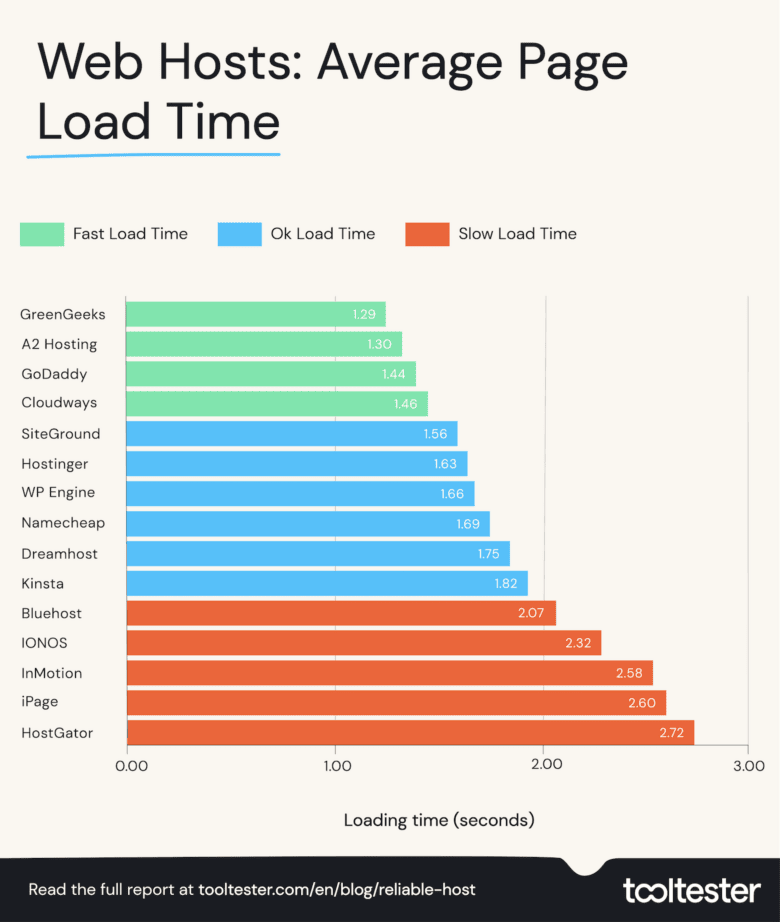
As you can see in the table below, Cloudways has got consistently faster, (both absolutely and compared to other web hosts), over the last three years:
2020 | 2021 | 2022 | |
|---|---|---|---|
Page Load Time in Seconds | |||
2.39 | 1.56 | 1.29 | |
3.15 | 2.01 | 1.30 | |
3.40 | 1.94 | 1.44 | |
2.32 | 1.73 | 1.46 | |
2.14 | 1.54 | 1.56 | |
4.19 | 1.61 | 1.63 | |
2.21 | 1.65 | 1.66 | |
– | 1.60 | 1.69 | |
3.28 | 1.84 | 1.75 | |
2.98 | 1.77 | 1.82 | |
3.07 | 2.87 | 2.07 | |
– | 1.95 | 2.32 | |
4.36 | 2.75 | 2.58 | |
4.19 | 2.76 | 2.60 | |
3.77 | 2.78 | 2.72 | |
Results in seconds
Although there are many things you can do to fix a slow website and make WordPress faster, your web host is the biggest contributor to the speed of your site.
So these numbers are a big deal!
Key takeaways: is Cloudways right for you?
Well, if you’ve been confused by any of the more technical terms in this review, such as CDN, staging, or server customization, you should probably look elsewhere. There are simpler alternatives that will host your site with good performance, and much fewer technical options. SiteGround or DreamHost come to mind.
If you’re after WordPress hosting, Cloudways is good, but there are alternatives like WP Engine or Kinsta, where you get support and infrastructure built especially for WordPress, and there are also cheaper WordPress hosts.
Now, Cloudways is probably one of the better options for managing and getting the most out of a hosting stack. That is, if you’re an agency with hundreds of sites in your portfolio, or a reseller, you’ll be able to move sites to the best data centers, hop on a different hosting plan when needed, and use the scaling options to meet the demands of huge traffic spikes.