
4.2
Very Good
The Best
Omnichannel chat
Pricing
The Worst
Simplistic automations
Some features can be glitchy
Starting From
$19 per agent/year to $42/agent/month
What is JivoChat?
If there were ever an award for the most ambitious live chat software, JivoChat would be a serious contender. On paper, it offers (almost) every feature you could possibly need in a chat tool - voice and video calls, customer relationship management (CRM), a ticketing system, and more.
Impressively, it also allows you to manage live chat conversations from other sources, such as Facebook Messenger, WhatsApp, Apple Business Chat, as well as email and SMS.
All this has helped it catch the attention of thousands of small-to-medium businesses, with over 250,000 websites using JivoChat’s live chat software. Part of the reason could be that its interface echoes that of familiar tools like Slack and Trello, meaning most users can get the hang of JivoChat pretty quickly.
But with such a comprehensive toolkit, does JivoChat go as deeply as it needs to in meeting its customers’ needs? Or does it spread itself too thinly?
Let’s find out as we take you through our JivoChat review.
JivoChat Pricing
Pricing shown is per agent per month when billed annually. Monthly and quarterly billing is also available for an increased monthly fee. Telephony and video calling services can be added to your Basic plan for an additional cost.
A more detailed look at JivoChat’s features
How do JivoChat’s triggered messages compare?
In general, live chat tools aim to reduce the amount of agent involvement in chat conversations as much as possible. The idea is to automate responses to more simple questions, whether through chatbots or automated/triggered messages, so that agents can focus on more complex requests.
JivoChat tries to achieve this in a number of ways. One such way is through pre-chat buttons, which allow you to automatically initiate a chat with a visitor, and have them select from three different options (which you specify). For example, if you run an online store, you might allow customers to choose from the following options:
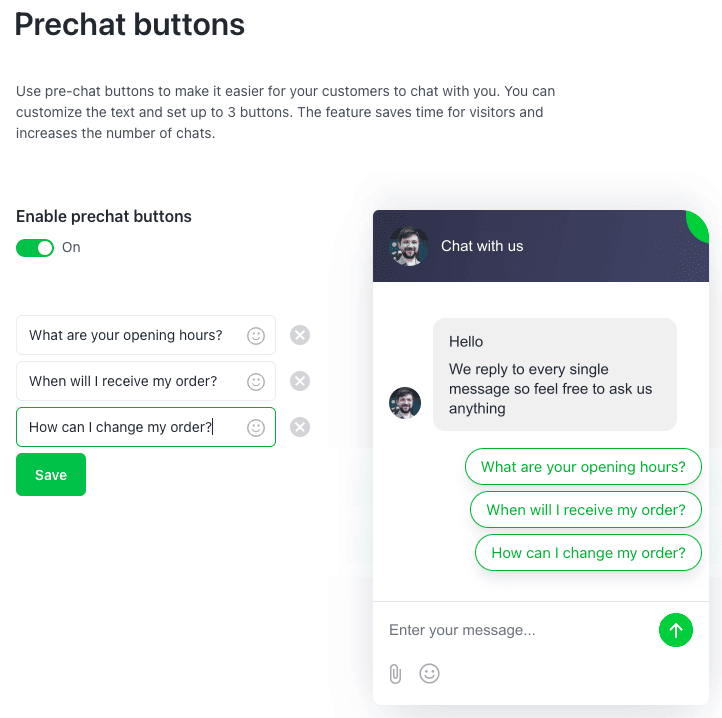
This example of JivoChat’s pre-chat buttons allows visitors to ask about opening hours, inquire when they will receive their order, or ask for instructions on how to modify an order
We feel like JivoChat could take this further, however. Although providing these options can allow agents to use pre-prepared responses, they still have to respond manually. It would be great, for example, if customers were automatically sent the opening hours when they select the first option. This is possible with tools such as Tidio and LiveChat, but strangely, not with JivoChat.
The triggered messaging feature (available in the Channel settings) also falls a little short. By default, JivoChat activates the following triggered messages for you:
Send a proactive message after a visitor has spent more than 10 seconds on a page
Ask for visitor to send questions via email form if there is no agent online
Display ‘agent busy’ message if visitor’s message goes unanswered after 60 seconds
You can also set up your own automations by combining various conditions, and triggering one of the following actions:
Open the form to send an email
Send a message to the visitor on behalf of an agent
Hide the widget
Display a system message in the chat (E.g. ‘All our agents are currently unavailable, but we’ll get back to you shortly’)
Display a system message in the chat with email field (E.g. ‘Leave your email address so we can get back to you’)
Here’s an example of a triggered message for someone who has visited 3 pages on the website:
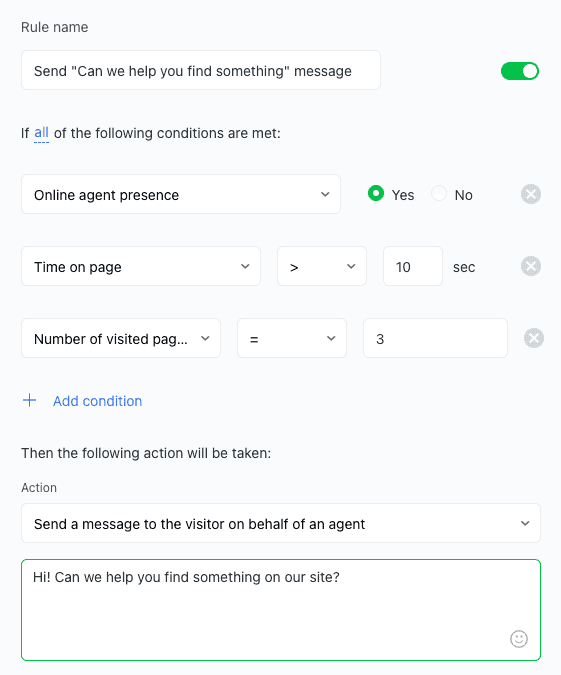
While it’s handy that you can add more than one condition (and choose from a long list of variables, including visitor location, time on page, and where the visitor has scrolled to in the page), it’s a shame that you can’t add multiple steps in the automation – something that a workflow-based editor would let you do.
Neither does JivoChat have the smarts to let visitors choose from various button responses (apart from in the prechat stage), or define steps for the various branches the conversation might take (which ventures into chatbot territory). If you’re after this kind of functionality, we’d suggest looking into LiveChat or Tidio.
JivoChat Review: Conclusion
After testing out JivoChat, it’s not hard to see its appeal. Any small-to-medium business looking to quickly and affordably implement live chat on their website will be impressed by JivoChat’s feature range, and how intuitive it is to use. The fact that it also offers a basic version of its live chat software for free is another big tick in its favor.
Its strongest feature, in our opinion, is its unified Contact Center, which gives you a view into all your chat, SMS and email communications with customers. From it, you can manage tickets, view customer information, and manage any sales opportunities linked to the visitor, making it a valuable tool for customer service, marketing, and sales departments.
Although we didn’t test them, the integrated voice and video calls are also interesting, particularly if you’re selling a complex product or software. At $33/operator/month, however, adding the video calling feature costs more than a subscription to JivoChat itself! So unless video calls are absolutely critical for your business, it’s a feature you might be better off without.
We did find one aspect of their marketing slightly misleading. On the JivoChat website, there is a section under ‘Features’ titled ‘Chatbots’, leading us to believe that this was an included feature. However, drilling down further reveals that while JivoChat supports the use of chatbots offered by third parties, JivoChat doesn’t offer this functionality natively. (Tidio, whose pricing is similar to JivoChat’s, includes chatbots as part of its plans.)
We also ran into the occasional glitch – for example, not being able to transfer chats or view accurate visitor analytics, and the Pointer function not working on our Wix website. This, coupled with a relatively simplistic automations feature, suggests that there are a few things that still need a bit of work.
However, if you’re after something that’s not overly complicated, and can help to unify some of your support, sales and marketing processes, JivoChat provides great value.