
4.5
Excellent
The Best
Solid speed
Uptime
The Worst
Only WordPress CMS
A lot of limits
Starting From
$30 / month
Kinsta Review
We’re constantly testing and reviewing different web hosts here at our website, and we’ve deemed a couple of them good enough for us.
First, there’s WP Engine, which we use for this site. But we also rely on Kinsta WordPress hosting for our sister site EmailTooltester, and we find there’s a lot to love about their offering. And just like WP Engine, Kinsta also uses Google Cloud Platform to power its infrastructure.
The question is: how does it compare to other providers, and should you purchase their plans yourself? Check this in the video below.
Kinsta Pricing
Note: For WordPress hosting, Kinsta lets you choose between a visitor-based pricing model (starting at 35,000 visits per month) or a bandwidth-based one (for example, starting at 20 GB per month). Here, a “visit” means a unique IP address accessing your site within a 24-hour period.
Kinsta supports a wide range of websites, with plans starting from $30 and going up to $563 per month for both Single-site and Multi-site options. These plans come in various tiers based on the resources your site needs. For example, if you’re expecting more traffic or need additional storage, you can upgrade to a plan that supports 500,000 visitors and includes 15 GB of storage for $242 per month.
The key thing to note is that the prices displayed here are for monthly payments. You get 2 months free when you buy annually, which I think is a pretty good deal.
Single-site | Multiple-site | Agency | |
|---|---|---|---|
WordPress Installs | 1 | 2 | 5 |
Monthly visits or Bandwidth | 35,000 visitors or 20 GB of bandwidth | 75,000 visitors or 40 GB of bandwidth | 1.25 M visitors or 60 GB of bandwidth |
SSD storage | 10 GB | 20 GB | 30 GB |
Free CDN | 100 GB | 100 GB | 200 GB |
24/7 support | Yes | Yes | Yes |
SSH Access | Yes | Yes | Yes |
Free SSL and imported SSL | Yes | Yes | Yes |
Staging area | Yes | Yes | Yes |
Unlimited users | Yes | Yes | Yes |
Multisite | No | Yes | Yes |
Premium migrations | 1 | Unlimited | Unlimited |
Price | $30 a month | $59 a month | $284 a month |
More information | |||
* Prices reflect monthly prices. Get 2 months free with annual plans, the first month is free on Single 35k, Single 20GB and WP 2 plans.
What can you expect from each Kinsta plan?
So obviously, the reason Kinsta has so many plans is that each of them is segmented based on the number of websites you can run, monthly visits, storage and CDN storage, which I don’t think many other providers usually limit.
Still, all of the plans include a number of features, such as the following:
Very good customer support team. It’s only via chat or email, but their agents are top-notch, and they work 24/7.
WordPress-specific site architecture (read: better and faster)
Unlimited free migrations (for WP2 plan and above)
Staging environment to test your WordPress website before publishing changes
Free premium migrations (concierge service). You get 1 for single-sites, and unlimited with the other plans.
Unlimited basic migrations from other hosts with their WordPress experts.
30-day money-back guarantee
Automatic database optimization
Automatic daily backup and manual backup points (& paid add-ons to have backups every 1 or 6 hours)
Now for specific plans, the names are pretty much self-explanatory.
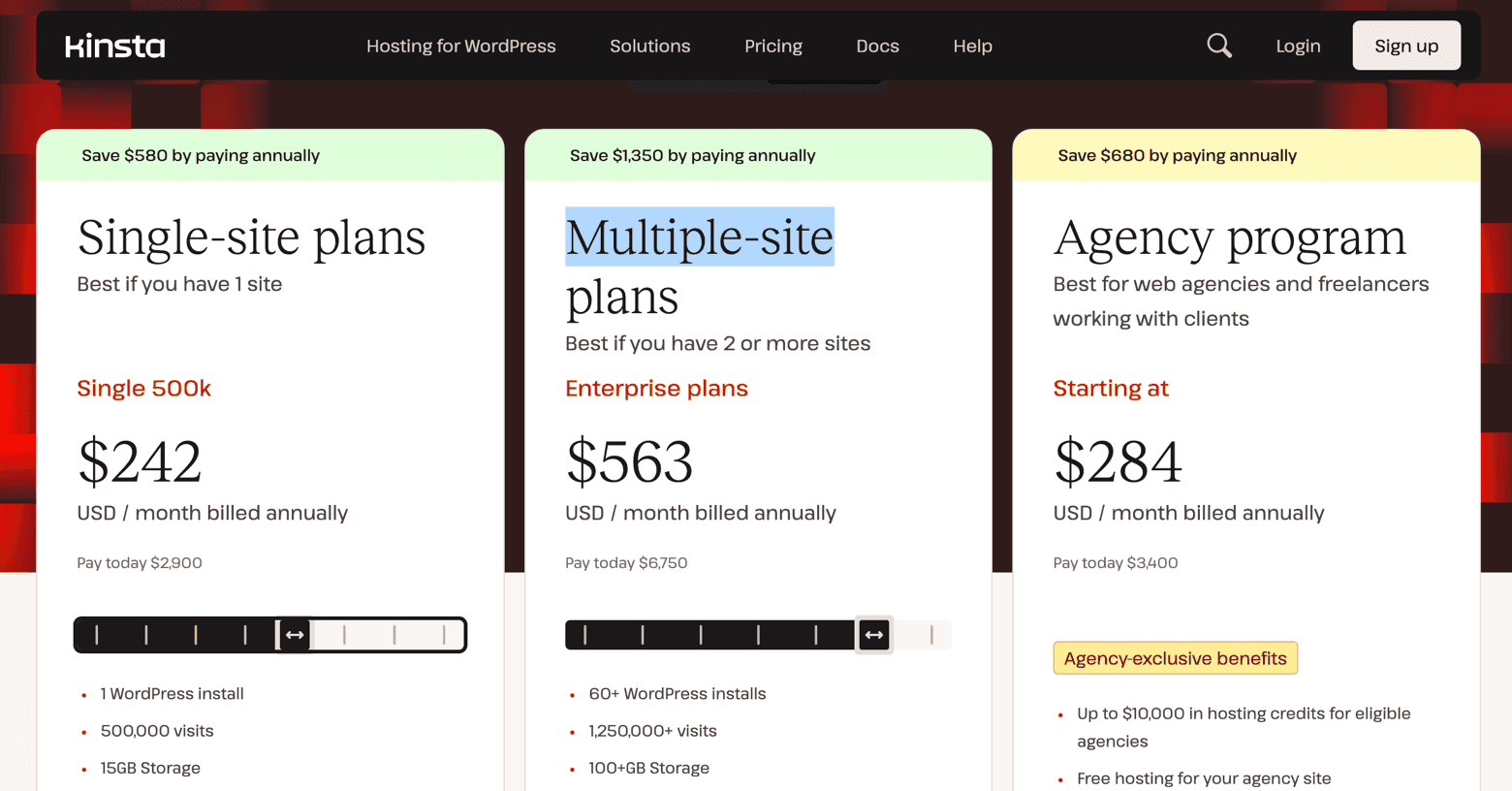
Monthly Kinsta WordPress hosting plans, yearly packages come out a bit cheaper but the full amount needs to be paid in advance
They also offer Disk Space Upgrades: should you ever run out of webspace you don’t necessarily need to upgrade to a higher plan. For $20 per month, you get 20GB on top. You can stack as many of these $20 upgrades as you like.
Single-site: Good for a small WP-hosted business website or blog. Just remember that if you deal with heavy files, for instance as a photographer or videographer, you might need to upgrade to the next plan or opt for a Disk Space add-on. You’ll be able to have a maximum of 35,000 visitors a month (or 20 GB of bandwidth) and 10 GB of storage.
Multi-site plan: Best suited for small to medium business websites. A large blog could also benefit from this plan. It includes up to 70,000 monthly visitors (or 40 GB of bandwidth), 20 GB of storage, and support for two hosted websites. If you need additional sites, storage, or a higher visitor allowance, you’ll need to pay extra.
Overral Conclusion
Kinsta Backups
One of the key features you want from your WordPress site is the ability to save and restore it at any given point. The good news here is that Kinsta offers quite a lot of options:
Daily Automatic backups for 14 days, 20 days or 30 days, depending on your plan
Manual backups possible
Backups every 1 or 6 hours as a paid add-on
You can download the manual backups
Cloud-backups with Google Cloud or Amazon S3 (roughly $2 a month for each site backup, plus $1GB for bandwidth).
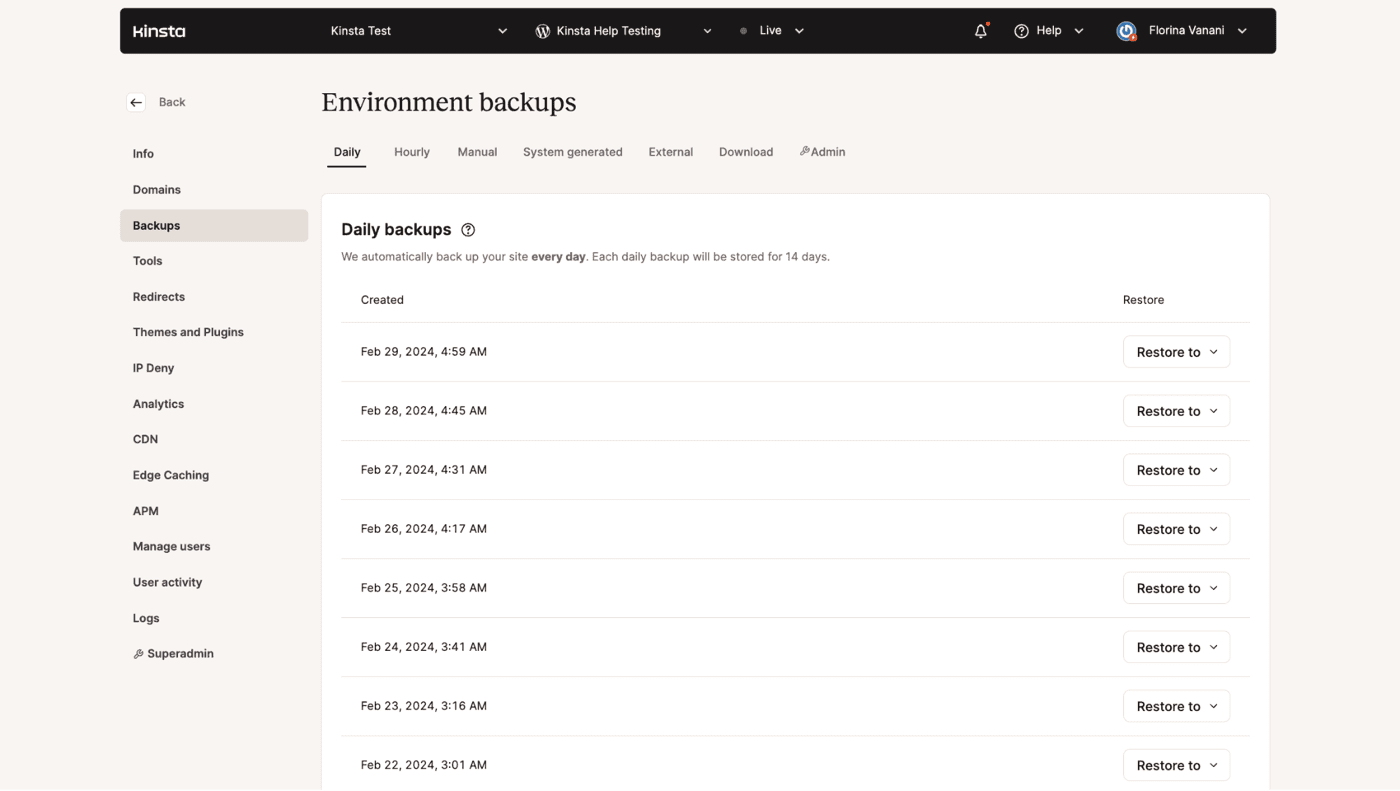
Kinsta backups
In my opinion, 14 days isn’t long enough to feel really safe about your site, but I’ll leave that up to you. On the flipside, you can also purchase and install add-ons that save your site every hour, or 6 hours.
I’d also like to note that backing up and restoring is super easy, thanks again to Kinsta’s excellent UX and great online resources. Compared to WP Engine it’s also blazing fast. What takes mere seconds with Kinsta, takes up to 5 minutes with WP Engine. This is because Kinsta only creates an incremental backup – similar to Siteground.
This has one important disadvantage: when your core files are corrupted, you’ll face a major problem. However, we’ve never experienced that and are not intending
Testing Kinsta’s managed WordPress hosting
Uptime tests
Our independent tests ran for 12 months, and as you can see below, it was a 100% success rate. Based on information and comments we’ve gathered online, this is a good indicator of how stable Kinsta is compared to other hosting companies.
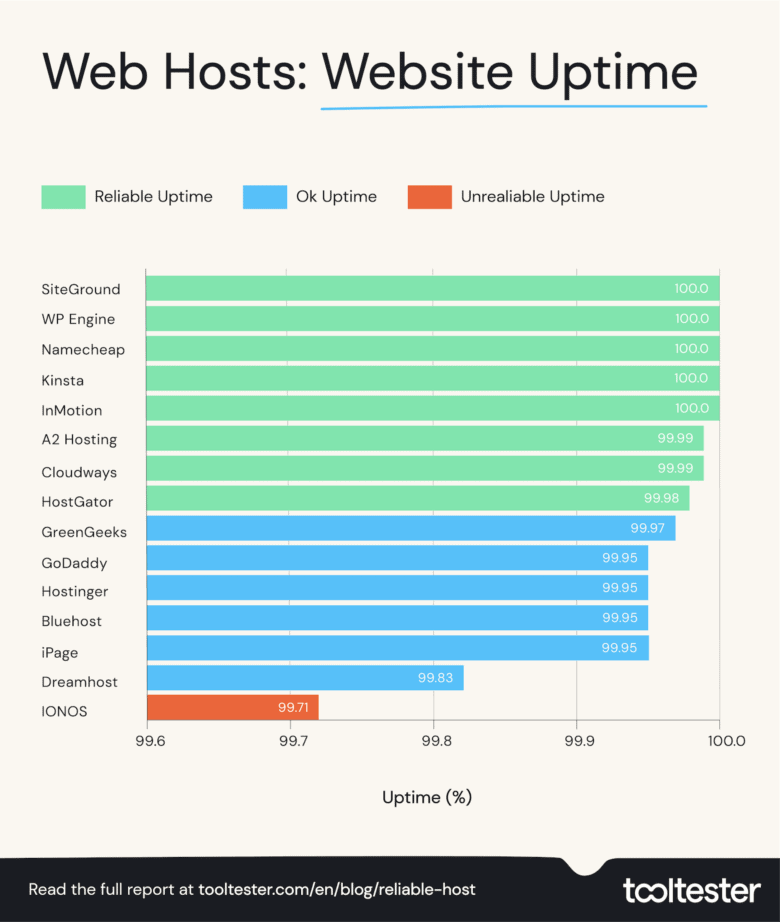
And as you see in the table below, Kinsta is the only web host to have consistently achieved perfect 100% uptime scores over the last three years. Very impressive!
2020 | 2021 | 2022 | |
|---|---|---|---|
Uptime % | |||
99.97 | 100 | 100 | |
99.99 | 99.99 | 100 | |
– | 100 | 100 | |
100 | 100 | 100 | |
99.73 | 99.95 | 100 | |
99.99 | 99.98 | 99.99 | |
100 | 100 | 99.99 | |
99.91 | 99.99 | 99.98 | |
99.98 | 99.98 | 99.97 | |
99.90 | 99.96 | 99.95 | |
99.48 | 99.92 | 99.95 | |
99.96 | 99.99 | 99.95 | |
98.45 | 99.85 | 99.95 | |
99.99 | 99.96 | 99.83 | |
– | 99.93 | 99.71 | |
To monitor uptime I use StatusCake, a tool that checks each website every 5 minutes.
Don’t forget that if the rate drops below the 99.9%, the Kinsta user agreement guarantees you’ll be refunded some of your hosting charges.
Is Kinsta fast?
Yes, a Kinsta is a fast hosting solution. The 1.82 average in our latest web host speed tests easily clears the 3.00 seconds recommended by Google for best SEO results (read more about the importance of fast website loading times).
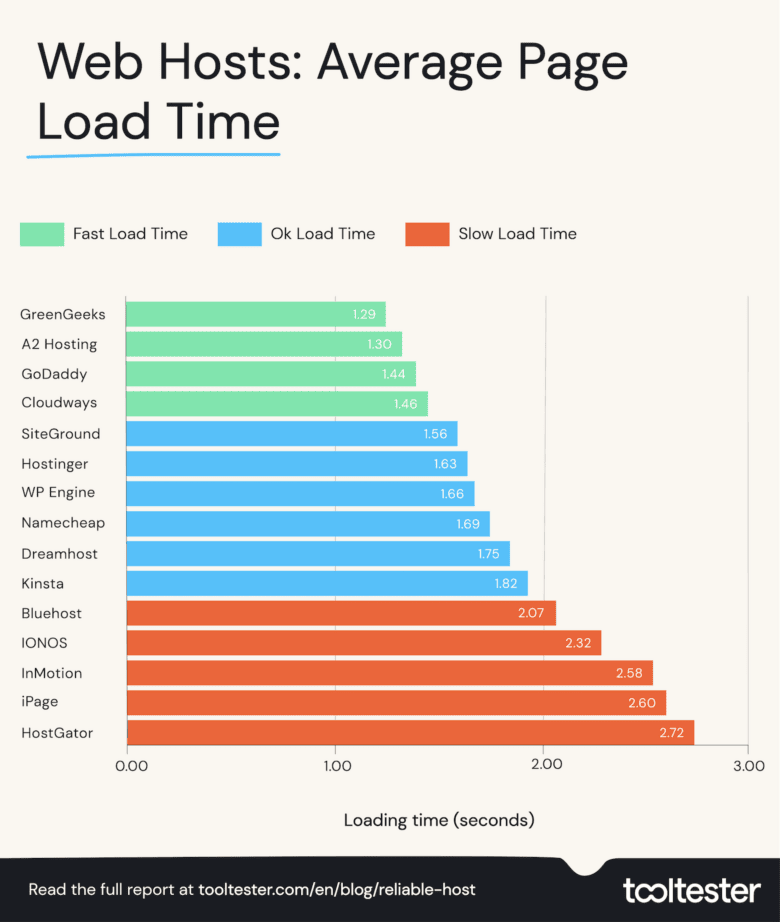
However, it’s certainly not the fastest web host that we’ve tested and as you can see in the table below, there are other providers that have consistently outperformed it for speed over the last three years:
2020 | 2021 | 2022 | |
|---|---|---|---|
Page Load Time in Seconds | |||
2.39 | 1.56 | 1.29 | |
3.15 | 2.01 | 1.30 | |
3.40 | 1.94 | 1.44 | |
2.32 | 1.73 | 1.46 | |
2.14 | 1.54 | 1.56 | |
4.19 | 1.61 | 1.63 | |
2.21 | 1.65 | 1.66 | |
– | 1.60 | 1.69 | |
3.28 | 1.84 | 1.75 | |
2.98 | 1.77 | 1.82 | |
3.07 | 2.87 | 2.07 | |
– | 1.95 | 2.32 | |
4.36 | 2.75 | 2.58 | |
4.19 | 2.76 | 2.60 | |
3.77 | 2.78 | 2.72 | |
Results in seconds
There are many steps you can take to fix a slow website and make WordPress faster.
But while Kinsta is not the fastest, these speeds should be more than enough to not frustrate your visitors.
Kinsta & WordPress
Kinsta is purpose-built to host WordPress sites, and it shows in part thanks to:
Malware Security Pledge: an interesting security feature, where you get priority in case something goes terribly wrong. You can put your site in maintenance mode via Kinsta, and they’ll run their malware removal service for free.
Free migrations: they are done by their team of WordPress experts to help migrate complex WordPress installations. It’s not unlimited with the Single-site plan.
Server-level caching: full-page caching combined with a free CDN and their own Kinsta cache plugin. All of it automates caching based on certain activities, such as publishing a new post.
WooCommerce optimization: for WordPress online stores, the caching is designed differently, for instance by not caching shopping cart pages, which helps with the checkout process.
Enterprise-level Cloudflare: this integration is available for all users at no additional cost. When using it, you’ll get a (top-notch) CDN network, wildcard SSL, DDoS attacks detection, Edge Caching and more.
Kinsta & Developer Features
For developers, you’ll be happy to hear that Kinsta also includes staging, integration with WP-CLI, Composer and Git, and one-click cloning.
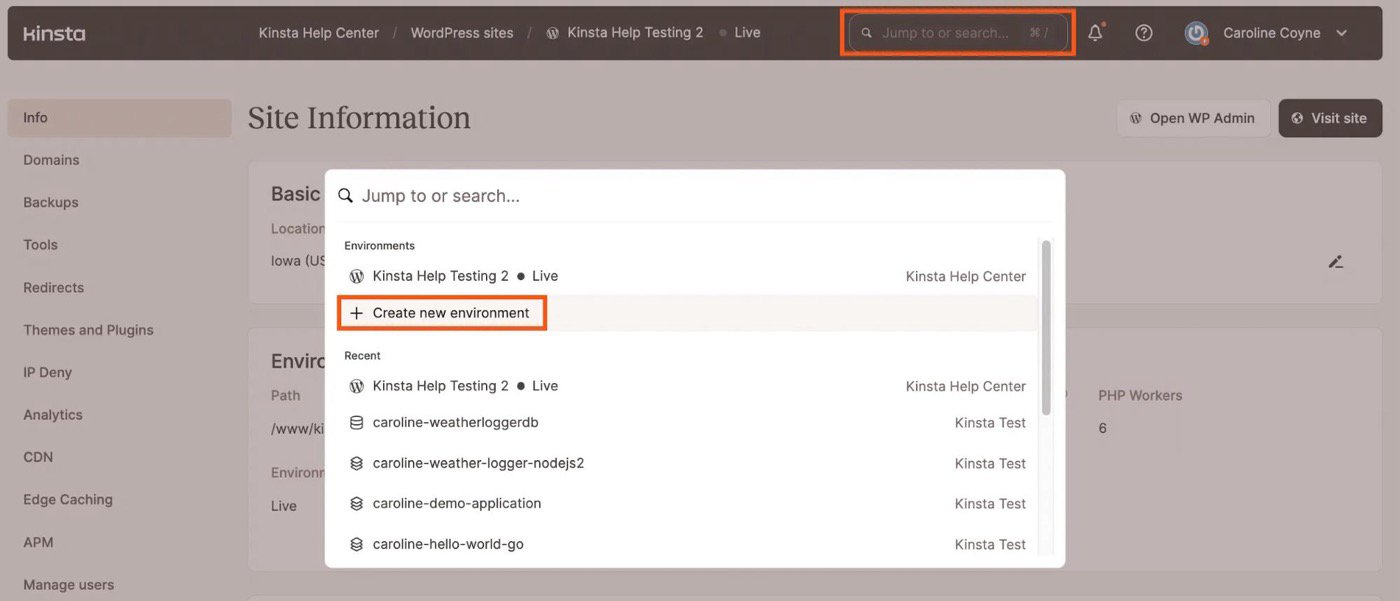
Creating a new environment at Kinsta
The staging environments is particularly well-designed, as you can see from the screenshot below:

Staging at Kinsta
Each environment works by creating a one-click copy of your site, but common sense applies when pushing the changes back to the live version (create a backup, double-check wp-config.php, etc…).
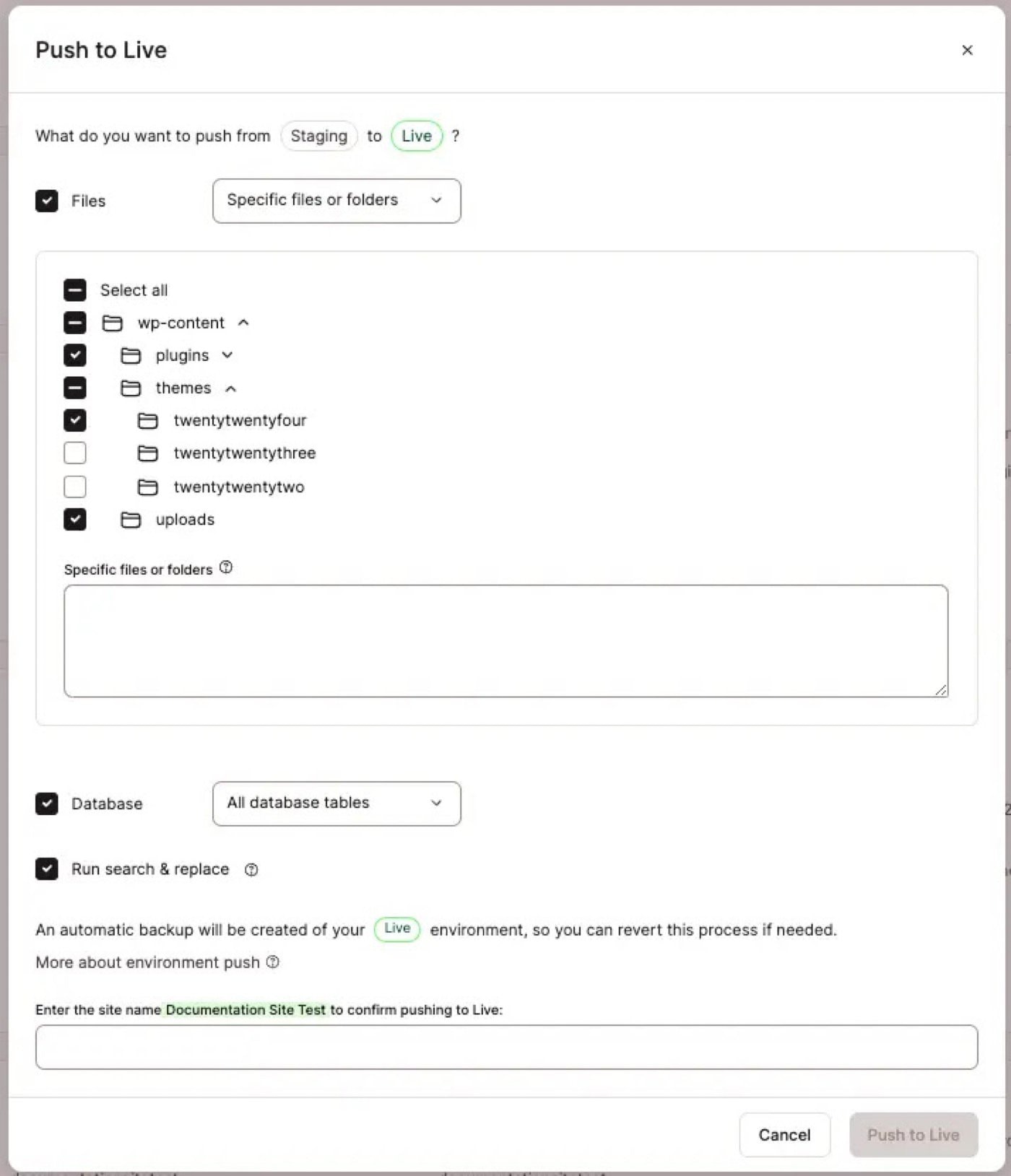
Pushing Kinsta staging to live
Final Kinsta Review Comments
Now let’s wrap it all up and gather our thoughts about Kinsta here.
The main takeaway for me is that Kinsta is reliable, fast, and good for business WordPress sites. That includes online stores too. Developers will love all the technical options and, and business owners will enjoy the ease of use and safety features.
But it’s certainly not for everyone. If you don’t need all the bells and whistles, you could look at:
SiteGround: for unlimited traffic and bandwidth. It’s more affordable and runs at blazing speeds. The only downside (or advantage maybe) is that they aren’t as WordPress-focused as Kinsta.
WP Engine: probably Kinsta’s closest competitors. They’re extremely similar in terms of pricing and features, but you get a few WordPress extras like free themes, phone support in higher plans and a guaranteed uptime of 99.95% (vs 99.90% at Kinsta).
DreamHost: one of the most affordable web hosts, with surprisingly good performance for US users. They cut corners on support times and advanced features, but worth looking at nonetheless.