
4.5
Very Good
The Best
Well designed
Lots of features
The Worst
Relatively expensive
Starting From
From $19 - $20/mo
Let's learn about LiveChat
LiveChat helps about 35,000 users worldwide to get their questions answered every day. Unlike email or FAQ support, having live chat software installed provides users with a live and direct experience.
Of course, you could also offer telephone support, but online chat support has some advantages that telephone support can’t offer. First of all, you don’t need an expensive telephone line or a complicated technical setup, and since you are working on a screen, LiveChat allows you to share links, images, and videos. What’s the saying? A picture is worth a thousand words.
Some notable LiveChat features
LiveChat is brimming with features and add-ons, making it an excellent lead generation tool. The customer service platform can be integrated on any website. All you have to do is copy and paste a piece of code. If you use a popular CMS like WordPress, Shopify, or Weebly etc., there are even plugins and apps available to integrate LiveChat without fiddling around with your code.
In fact, integrations are one of the things LiveChat does best. You can connect the Facebook Messenger directly with LiveChat and WhatsApp, meaning your agents don’t need a Facebook account, and you won’t miss any messages, because you can handle everything from one place. Integrations with top CRMs and email marketing services are also available - in fact, there are over 200 tools you can connect LiveChat with.
The ticketing solution, HelpDesk, which was once integrated into LiveChat, is now a standalone product (starting at $29/month). Of course, it can still be fully integrated if desired. However, thanks to the (Intercom-style) Asynchronous Communication feature, LiveChat can also default to handling requests that arrive when no agent is online.
LiveChat’s AI suite includes a Copilot assistant that suggests context-aware replies with cited sources, automatic insights and tag suggestions, concise chat summaries, text improvements, and data analysis.
How much does Live Chat cost? (Spoiler: it's not the cheapest)
LiveChat offers a 14-day trial for their Team plan (no credit card required). You can either pay per month or per year. If you choose per year, you’ll see a discount applied to your bill.
There are four different pricing tiers to choose from: their most affordable package "Starter" is priced at $19 per month per agent, which comes with 1 targeted greeting (automation), a 60-day chat history, and the ability to track up to 100 visitors in real time.
If you need full chat history, unlimited greetings and analytics, you should take a look at the "Team" ($49) plan. The "Business" ($79) tier is designed for larger teams and adds a staffing prediction as well as a work scheduler module. Find out more about LiveChat pricing here.
As you can see, it's certainly not the cheapest live chat software around. Let's find out if it's worth the high price tag!
LiveChat Pricing
*Monthly prices based on a 1-year contract for 1 agent. With a yearly plan, you can save up to 17%.
A more detailed look into the live chat software
Seats vs. Agents
In the past, LiveChat limited the number of seats and not agents, whereby you could add as many agents as you wanted, but a seat could only be occupied by one agent at a time. Now, unfortunately, you’ll have to pay per agent, thus making it a fair bit more expensive for companies with numerous agents.
Adding additional agents is quite flexible. You can add them on-demand to any plan.
How do agents work with LiveChat?
As an agent, you log in and decide when you want to accept live chats. From then on you can decide whether chats will get distributed automatically or manually.
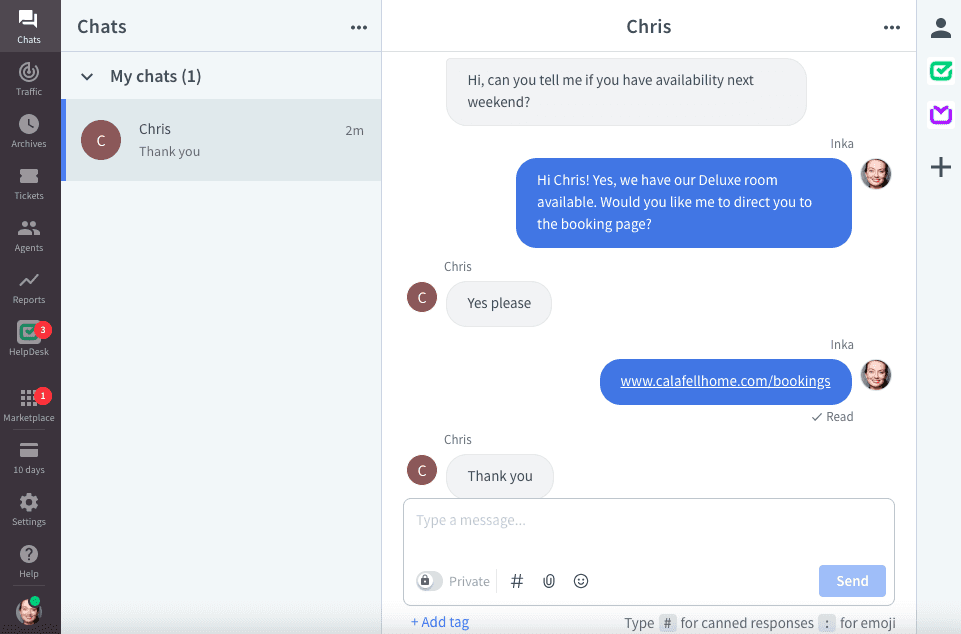
To make the chat experience more efficient, you can automate welcome messages, pre-chat questions and use canned responses for repetitive sentences. If a chat agent runs into a difficult question, (s)he can transfer the visitor to another agent to solve the problem.
At the end of each chat, users can leave their feedback. In case you couldn’t solve the problem, LiveChat opens a ticket and sends a follow-up email to the client automatically. This will help buy you time, and even more importantly, will avoid an angry customer because you forgot to get back to them!
A nifty new AI-based feature is the option to receive a summary of your chat. This is particularly useful if you are transitioning a lengthy chat to another agent.
Chatbot Integration
It’s unlikely your live chat operators can be online 24/7. So what do you do if you don’t have the staff to work around the clock? You can either reply by email for any missed chat or you can use a chatbot, which LiveChat offers as an add-on service.
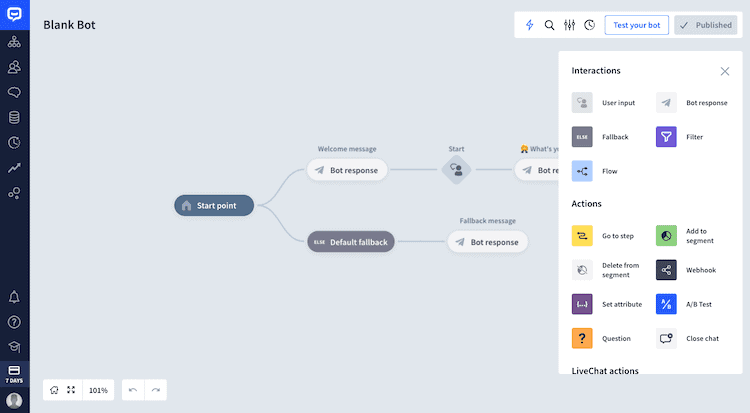
Setting up a story in LiveChat’s Chatbot solution
Another advantage is that a chatbot can handle several customers at the same time. Of course, it’s not very personal, but it could help your visitors to get an answer immediately.
So what’s the downside of adding a chatbot? Basically, it means extra costs. Chatbots aren’t part of any LiveChat plan. They start at $52 per month and need a free seat. If you’re after a more affordable alternative for chatbots, we’d recommend Tidio.
LiveChat Reports
You might wonder how your chat sessions actually perform. How long are they? Where are my visitors from? How’s the chat quality of my agents? And so on.
LiveChat can help you with all these questions. Their statistics will tell you if your quality improves or if it’s getting worse. Thanks to real-time metrics you can see immediately how many visitors are online and if you have enough staff to handle them all.
LiveChat will also send you email reports to understand what has happened. For instance, as customers can leave feedback, you can see if this has improved over time. Or were there some tough cases that you could have solved better? Reports are part of their Team plan and higher. It’s also possible to purchase standalone agent performance reports on the LiveChat Marketplace – pricing is per agent, per report.
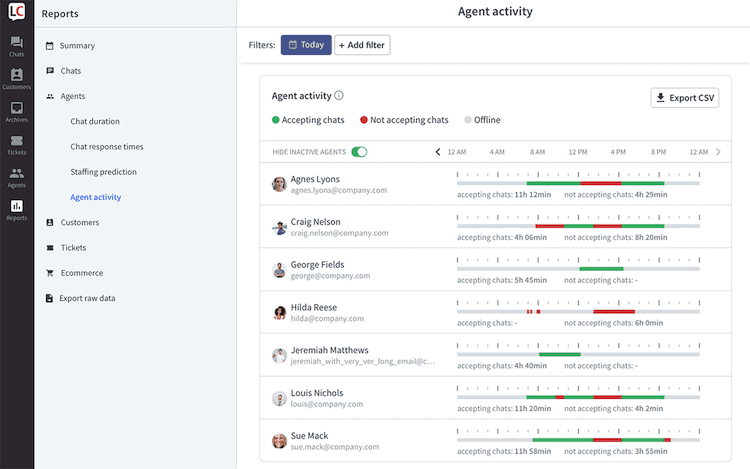
An agent activity report in LiveChat
LiveChat Support
In my opinion, it’s not super complicated to understand the product, once you have added it to your website. However, customer support is always crucial. As you might have expected it, there’s live chat. Also included in all plans are 24-hour email support and phone support. Plus, you have an excellent Help Center and LiveChat Community.
The highest plan “Enterprise” has some exclusive features like a product training for your agents, legal assistance and a key account manager.
Even though you can use LiveChat in different languages, their own customer support is only available in English.
LiveChat Review: Conclusion
LiveChat is one of the products we thoroughly enjoyed reviewing. It just works really well and is fun to use. We were also surprised that compared to most other live chat tools we’ve had running on our site before, the number of chat requests always went up with LiveChat, even though we used the same setup (automatic trigger after 3 minutes).
A feature that sets them apart from their competition is the ticketing system. Offline messages go directly into this channel and can be handled more easily by your customer service team with different statuses (open, pending, solved).
LiveChat’s feature list, in general, makes it an ideal solution for companies who want to proactively employ live chat as a sales or support channel. Its wide list of integrations, engaging ‘rich messages’, advanced team management features and excellent multilingual widgets make it so much more than ‘just another live chat tool’.
It is not the cheapest live chat software, but certainly one of the best. And compared to industry giants like Intercom, it’s certainly a more affordable alternative. Their customer support is top notch and, at the risk of repeating myself, the user-experience with their software is just fantastic. If Apple were ever thinking of acquiring a live chat software, I think it would be this one.