4.1
Very Good
Starting From
Namecheap Review
Most of us know Namecheap as one of the best (and cheapest) places to register domain names. But did you know they also offer incredibly cheap web hosting too?
Well, they do! And in this Namecheap hosting review, we’ll be looking specifically at their EasyWP shared hosting for WordPress to determine whether it’s a good option for your website.
We’ll review how easy it is to use, what sort of useful features are included (and excluded), whether it’s fast and reliable enough and how well their customer support performs, as and when you need it.
Let’s get into it...
Summary
Namecheap EasyWP hosting is the cheapest web host we review at Tooltester. Despite this, it has provided consistently reliable uptime and fast load times over the last three years.
However, be aware that the EasyWP plans are very basic. You’re limited to just 1 website on all the tiers, you can only use WordPress, there’s no email or free domain name and many other features are restricted, in what is a very sparse backend control panel.
Customer support is fast and knowledgeable, though. So if you’re looking for really cheap, fast and reliable web hosting for just 1 WordPress website, and you don’t need many extra features, Namecheap EasyWP is a good choice.
What is Namecheap?
Namecheap is a domain name registrar that was founded in 2000 in Arizona, United States. It also provides web hosting, email hosting, SSL certificates and VPV services.
Namecheap has 11 million registered users and 10 million domains. Indeed, according to Statista they are the biggest registrar worldwide after GoDaddy – about 8% of all domain names are registered with Namecheap.
In this review, we will concentrate on their shared hosting plans for WordPress. However, we will also take a quick look at the other products they offer too.
Namecheap EasyWP Pricing
There are several hosting packages and other products that Namecheap offers (see below).
But this Namecheap review will focus on their EasyWP hosting plans for WordPress – we picked this one to test, as we love (and use!) WordPress and thought its affordability would be interesting for other WordPress site owners.
Plan | Starter | Turbo | Supersonic |
|---|---|---|---|
Sites | 1 | 1 | 1 |
Webspace | 10 GB | 50 GB | 100 GB |
Visits per month | 50.000 | 200.000 | 500.000 |
Resources (CPU & RAM) * | 1x | 1.5 more | 2x more |
Caching | Yes | Yes | Yes |
Free CDN included | No | Yes | Yes |
SSL certificate | No | Yes | Yes |
99.99% uptime | Not guaranteed | Not guaranteed | Not guaranteed |
Automatic WordPress updates | Yes | Yes | Yes |
Yearly renewal prices * | $4.07 a month | $7.91 a month | $9.57 a month |
Support | 24 h | 24 h | 24 h |
More information | |||
* Namecheap marketing materials or legal documents don’t seem to disclose the exact amount of CPU and RAM allocation that each plan gets. Prices reflect the monthly cost of 1-year contracts, the full amount needs to be paid in advance.
Price Increases on Renewal
Almost all web hosting companies offer very cheap introductory prices to encourage you to sign up.
However, these prices are not realistic in the long term. When the introductory offer ends, your plan will automatically renew at higher prices that better represent the product, and it’s these prices that you’ll pay going forwards.
For this reason, at Tooltester, we always use these renewal prices to evaluate and compare different web hosts and these are the prices you’ll see listed in this article.
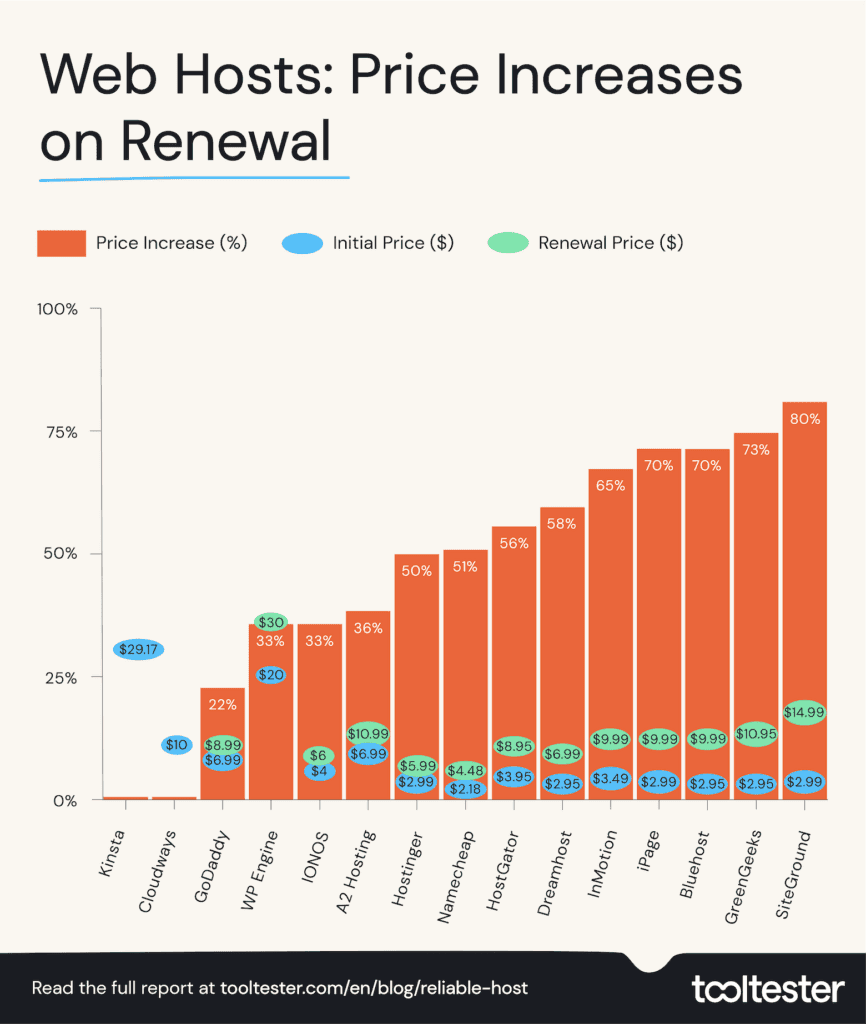
Often the renewal prices are many times higher than the introductory prices. With Namecheap, they are more than double. But since Namecheap’s initial prices are so low, it’s less of an issue than with other hosts.
Price Transparency
Although cheap introductory offers followed by price increases on renewal are an inevitable consequence of a competitive market (and do have their advantages), I expect hosting companies to be transparent about it.
This means that on their pricing and purchase pages:
The renewal price is clearly displayed (and explained) next to the introductory price
How long you have to commit to, to get those introductory prices (1 year, 2, years etc), is also clearly displayed (and editable)
Unlike many other web hosting providers, Namecheap does a pretty good job here.
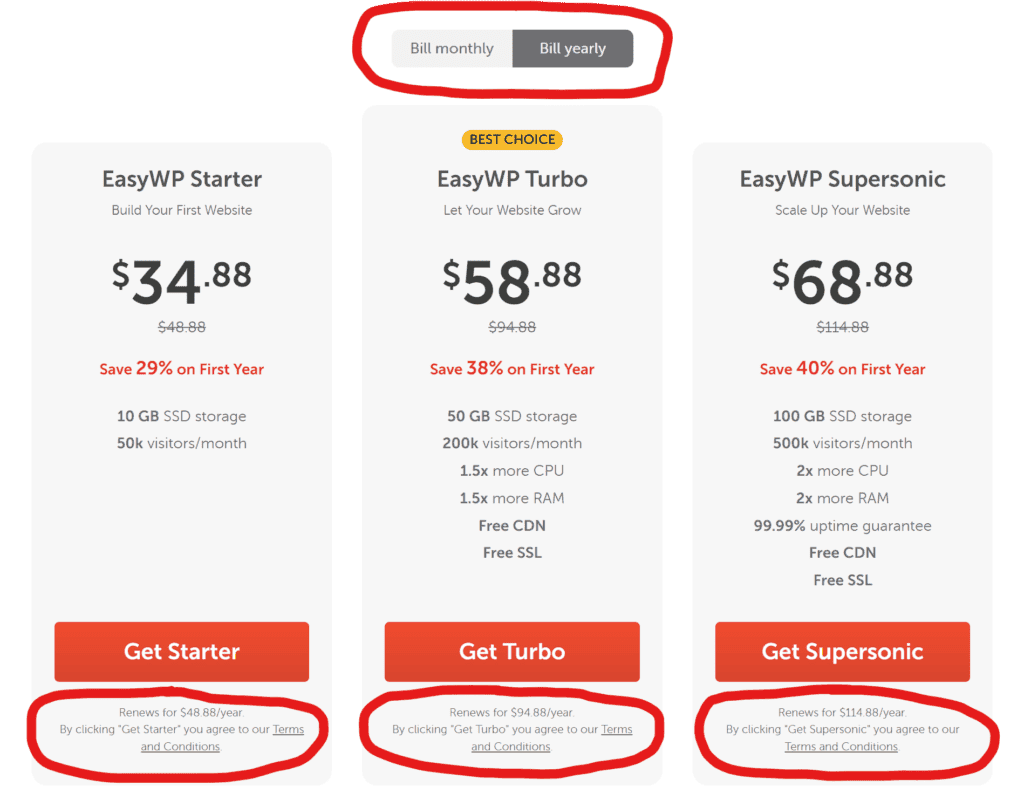
It clearly says under the introductory price that it’s limited to the first year, and under the buy button the renewal price is also clearly written (albeit in much smaller text).
There is also a toggle which you can change to see the different prices for monthly or yearly payment periods.
I like the fact that (unlike other providers), the yearly prices indicate the full amount you will pay for the year, rather than its monthly equivalent. This avoids nasty surprises at checkout.
Namecheap Review Conclusion
Namecheap’s EasyWP WordPress hosting plans are probably a bit of a niche choice in all honesty.
They are the cheapest hosting plans (on renewal) that we have reviewed at Tooltester. And when you consider the relatively fast loading speeds and excellent uptime scores, they definitely look like a bargain.
However, the EasyWP plans are incredibly basic in terms of features. You are limited to one website, it must be built on WordPress, and there’s no email, free domain name, or automatic daily backups.
Plus, unlike every other hosting provider, you don’t even get free SSL on the lowest tier plan!
While the control panel, is fast and responsive and refreshingly uncluttered, it’s also incredibly limited (you can’t manually change the PHP version, for example).
You can, of course, pay a bit extra if you need any of those features which are not included. However, then EasyWP won’t seem like so much of a bargain. And there’s nothing you can do about the limited control panel!
So who is Namecheap EasyWP hosting for? And who is it not for?
When to use Namecheap EasyWP Hosting?
Namecheap EasyWP is a good option for small and medium-sized projects that only need one website and use WordPress as their CMS of choice.
It’s a reliable option for those looking for a simple host, as it limits how much control you can have over your hosting account (e.g. can’t change your PHP version).
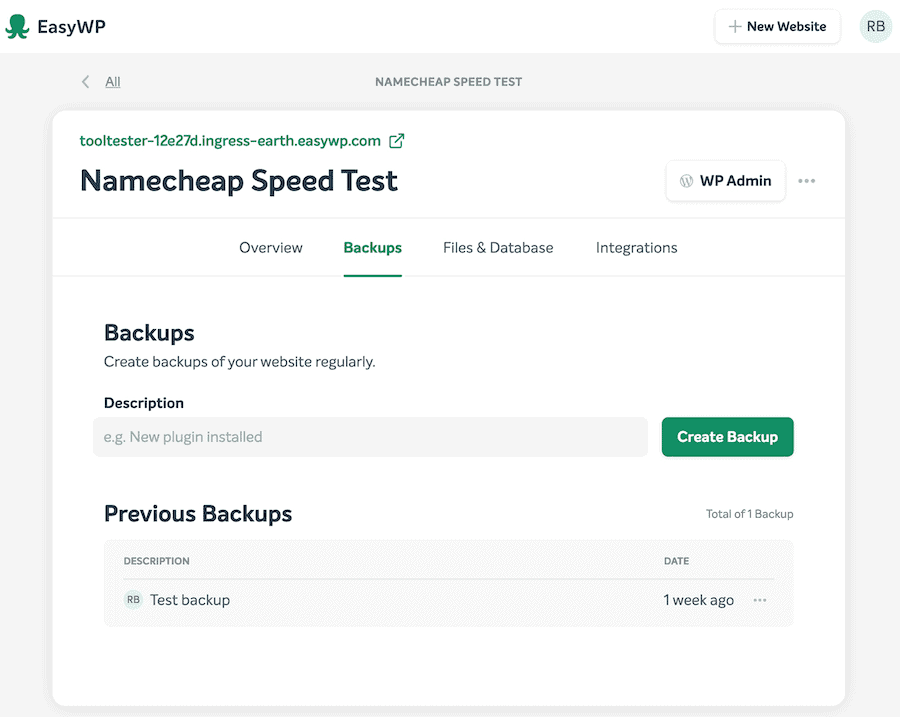
Another important aspect to consider is the lack of automatic backups; you can create your own, but Namecheap won’t be automatically creating any for you. So consider using a plugin for automatic backups.
When to not use Namecheap EasyWP Hosting?
EasyWP from Namecheap won’t be for you, if:
You want to host a site that’s not powered by WordPress
You need Windows-based hosting
You need all the hosting bells and whistles like staging areas, daily backups or SSH access
You are a team of developers or agency as there aren’t independent logins
You plan to host more than 1 website