
4.3
Very Good
The Best
Good blog integration
Sell services and subscriptions
The Worst
Not as easy to use as other tools
Limited automatic sales taxes
Starting From
$23 / month
Squarespace Ecommerce Review
Squarespace Ecommerce is a versatile store builder for anyone thinking about selling products or services online.
It offers several advantages over other ecommerce platforms: Ultra-modern templates, flexible product pages, and the ability to sell subscriptions and members-only content.
However, there are a few limitations to be aware of. We’ll cover them all in this Squarespace Ecommerce review.
Squarespace has made a name for its website builder (and in particular, its excellent blogging features), thanks to its loyal, ever-growing following of creatives, artists, and celebrities. But that’s not where the growth comes from. These days, all the big-name website builders seem to be striving toward one thing - ecommerce. Especially after seeing Shopify’s stock explode following COVID-19.
Squarespace is no exception. Its ecommerce solution is geared toward creators, artists, and other small businesses that want to be successful online. Where Squarespace differs from Shopify is that it’s geared more toward digital products - downloadable files, online classes, and premium content. There’s also inbuilt support for selling subscriptions and services, which Shopify doesn’t offer.
On the flip side, Squarespace isn’t as strong as Shopify if you’re looking to sell physical products - it lacks the full range of shipping and fulfillment options provided by Shopify, and also offers fewer payment options (for example, manual payments are not an option). Outside of the US, automated tax calculations are not available, and it’s not possible to sell in multiple currencies.
So how well can Squarespace Ecommerce serve your online store needs? Let’s find out.
Tip: Squarespace is not the only online store builder that we have tested. Check out our guide to the best ecommerce website builder if you want to learn more.
How easy it is to set up Squarespace Ecommerce?
There’s no complicated installation process involved because you manage everything in your browser. Signing up for a Squarespace account is free and doesn’t require a credit card, and you have 14 days to put Squarespace to the test. After the free trial, they’ll ask you to upgrade to a paid plan.
If you already have a Squarespace website (for example, for your portfolio or business site), the online store can be added with just a couple of clicks. You’ll also be able to easily switch over to any of the Squarespace Commerce plans (more on that below).
How much does a Squarespace Online Store cost?
Squarespace has three plans that come with a fully integrated online shop. They have no product or bandwidth limit. In plain English: You can sell as much as you want to as many people as you want.
The cheapest ecommerce plan, “Core”, starts at $23/month. However, it charges an additional 3% transaction fee on sales and comes with basic ecommerce features only. If ecommerce is the main goal of your website, we wouldn’t recommend this plan.
Instead, the Plus plan would be the better option since it ditches those extra fees. Furthermore, your customers can create their own accounts. You’ll also have access to the Squarespace Point of Sale (POS) app, advanced analytics, and Instagram product integrations. It’s per month.
The highest plan, Advanced ($99/month), has some neat features like real-time rates for shipping carriers, abandoned cart recovery, advanced discount options, and the ability to sell subscriptions. Check out our detailed Squarespace pricing guide if you want to know more about monthly costs.
Squarespace Ecommerce Pricing
Monthly prices based on 1-year contracts; Domain name included.
A More Detailed Look at Squarespace Ecommerce's Top Features
What can I sell with Squarespace?
It depends on your plan, but Squarespace is quite flexible. You can use it for:
Products for shipping and pick-up
Digital products (ebooks, MP3s, photos, etc.)
Subscriptions (online courses, newsletters, etc.)
Gift cards (for your store)
Donations from your website visitors
Of course, there are some limitations. While there are integrations with dropshipping and print-on-demand services like ShipStation, ShipBob and Printful, other solutions like AliExpress, Amazon Fulfillment or eBay Fulfillment aren’t supported (yet). If you need such a solution, we recommend you check out our Shopify Oberlo review.
Adding products and services
The process is straightforward. You select what type of product or service you want to add, upload your photos and fill in your information.
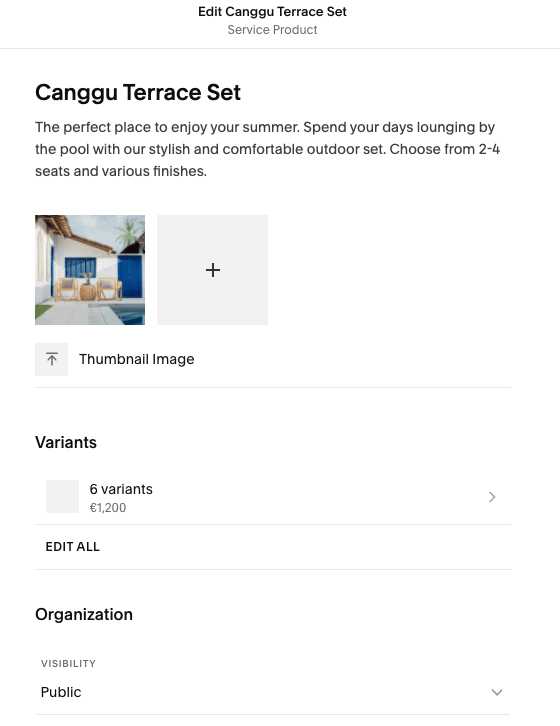
Adding a product in Squarespace’s product editor
In case you offer product variations, that’s not a problem. Instead of adding a t-shirt three times in different colors or sizes, you simply add the variant to the existing product. This will save you some time and keep your store better organized.
What I like is that you can add a form to ask for further details. Let’s say you provide customized tote bags – customers can tell you exactly what they want printed on their bag. However, it’s not a customizer with a preview function.
What are Squarespace’s payment options & fees?
Squarespace Ecommerce provides two payment options: credit card and PayPal. Credit card payments are handled through Stripe’s payment gateway. Customers can check out with Visa, Mastercard, American Express, Discover and Apple Pay. Afterpay is also available in most English-speaking countries.
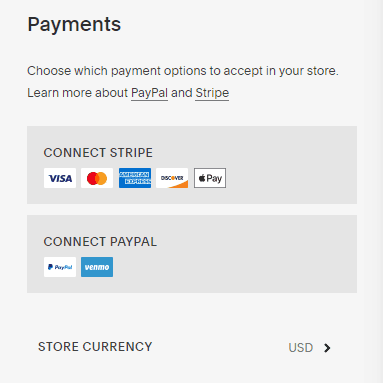
You can define one currency for your store ($, €, ¥,..). However, it’s not possible to offer your products in various currencies.
They also introduced Squarespace POS, which is a payment solution for physical stores. This will make sure your inventory and customer data is always in sync – both online and offline. You can get credit card readers and other hardware through Square, the service they are using for POS.
Unfortunately, there aren’t any offline payment options like cash or bank transfer. So even if a customer wants to pick up his order at your store, it has to be paid online.
This brings us to an important point: transaction fees. Both Stripe and PayPal will charge you a transaction fee for sales. Typically, this is 2.9% + 30¢. Prices can slightly vary, depending on your country.
On top of that Squarespace will charge you 3% in their Core plan (which is technically not part of their eCommerce plans). We therefore highly recommend you pick an eCommerce plan (Basic or Advanced) to avoid these extra fees!
Overview of Squarespace Commerce’s shipping options
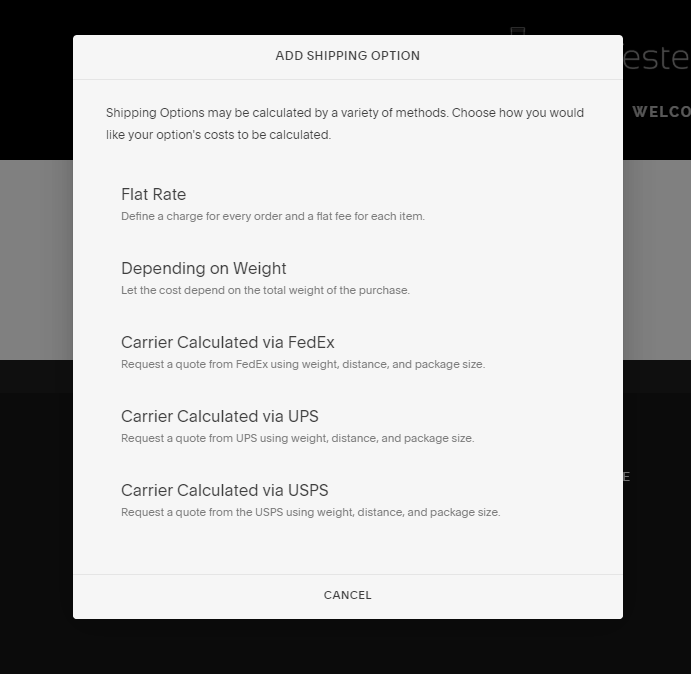
Let’s start with the easiest shipping option: flat rate. You can either offer it for a whole order or per item. The big advantage is that customers won’t be surprised about the shipping costs at the checkout. The flat rate can be also used for free shipping.
If the weight is crucial, you can pick the “Depending on weight” option to define specific shipping cost ranges. Keep in mind that this option neither accounts for package volumes dimensions, nor shipping distances.
For more convenience, it’s also possible to choose carrier calculated shipping. The costs will be automatically calculated by the carrier. You can select FedEx, UPS and USPS. This option will give you the exact price – no matter how far, heavy or big the parcel is.
Even though the shop can’t handle payments in cash, you can offer store pick-up. Customers have to pay for their purchase online. We wish Squarespace were more flexible here.
Setting up the taxes
Let’s talk about taxes! No one likes them because they make things complicated. Even though Squarespace can’t provide any legal advice, they offer a detailed how-to guide to set up the taxes the correct way.
It works like this: The tax rates can be manually applied on products, services and shipping. Outside of the US and Canada, taxes can be applied only on a country level. In Canada, you can apply province-level taxes, while the US lets you set taxes on states and zip codes, e.g. United States 0%, Florida 6%, Miami Dade County 1% (meaning a combined sales tax rate of 7%).
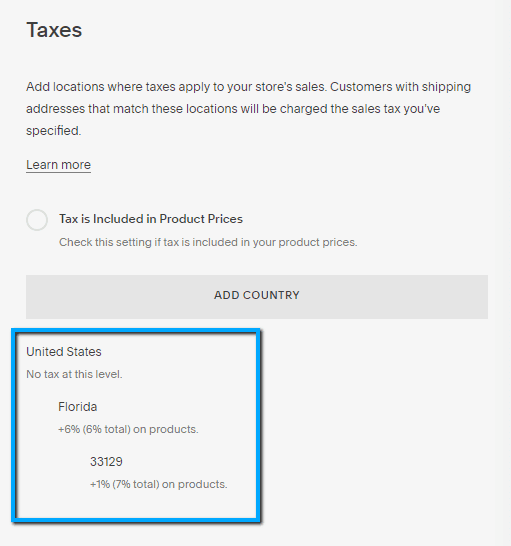
If you’re located in the US, you’ll also be able to apply automatic taxes using the TaxJar extension, which is free if you sign up for it via Squarespace on the Plus and Advanced plans. This will automatically calculate taxes based on states, counties, cities and zip codes.
Squarespace also creates invoices. You can always download them as an .xlsx-file and import them into an accounting software. However, to make your life easier, you can connect your online store with accounting services like TaxJar and Xero via the Squarespace Extensions marketplace. Even though they cost extra, they will help to eliminate the hassle of sales tax collection.
Squarespace Marketing and Social Media
Once you’ve created your online store, get ready for the real work to begin. Launching a shop and waiting for new customers won’t work. You’ve got to put some sweat into it.
Luckily, Squarespace isn’t an isolated ecommerce solution. It’s great for social media because you can connect the online store with Facebook, Pinterest and Instagram. So, reaching a new audience and turning them into loyal customers isn’t a problem with Squarespace.

But that’s not all. You can also send emails from your online store. Up to three campaigns are included. If you need more, you have to add an email plan to your store. Of course, you can also use other providers like Mailchimp or ActiveCampaign.
There is a direct integration with MailChimp available but since Squarespace also offers a connection to Zapier you can connect your site pretty much with any popular newsletter service. This will allow you to subscribe customers in the checkout process.
And if you like, you can even throw pop-ups and announcement bars at your customers. Don’t go too over the top though!
Performance and analytics of your online store
Of course, you want to know your audience better. Squarespace can provide some analytics about your sales, traffic and other activities. This is very handy in order to improve the overall experience and shop strategy.
You might find out that most customers live in Chicago or have never returned after their first purchase. Or maybe Instagram performs much better than Google or email marketing. This info can help you launch a new campaign to get them back.
Squarespace also track the internal site search. Maybe people don’t find what they are looking for. I guess it’s time to take some action, because you might lose a sale.
If you love juggling with figures, you’ll love their Squarespace Analytics app. It’s available for iOS and Android.

Squarespace Ecommerce Review: Conclusion
Squarespace’s online store is a solid way for small businesses to get their merchandise out to the public. It’s directly integrated into their website builder and can always be added after creating a website, without any problems. All of Squarespace’s templates are compatible with the online store.
Let’s quickly recap how they fare in each of the key categories.
Ease of use
Setting up the store is not complicated. Most steps are self-explanatory and very well explained (partly with video). The new product editor makes the overall editing experience simpler, although we think the menu could be better structured to make it easier to jump from editing your website to managing your store.
Selling more than just products
We like that you can not only sell physical goods, but also digital goods, services, memberships, and subscriptions – something particularly interesting for bloggers, content creators, and freelancers. Especially when you consider how tightly it can integrate with platforms like Instagram and Facebook, if you’re planning on selling there too.
Payment, shipping and tax options
However, having only two payment processors (Stripe and PayPal) is a bit too limited for our taste. In order to avoid Squarespace’s own 3% sales transaction fee, you have to sign up for one of their ecommerce-focused plans, which are $39 (Plus) or $99 (Advanced) per month. This makes sense when you are making more than $3000 in yearly revenue.
Shipping and taxes are quite flexible, but Squarespace could improve the tax settings. Adding new tax rates isn’t a problem, but having an automated solution for countries outside the US would be more intuitive.
Integrations
Squarespace offers a decent range of integrations with a range of shipping, fulfillment, and dropshipping providers, although you might find yourself a bit limited if you’re based outside of the US. Similarly, it could offer better multilingual and multicurrency support.
If you are planning to scale your online store massively, you might find that a dedicated ecommerce provider like Shopify or BigCommerce gives you more room to grow (read our BigCommerce review and our Shopify review, or our Shopify vs Squarespace or BigCommerce vs Shopify comparisons).
It is great though that Squarespace keeps improving their product, most recently adding Squarespace Extensions, a repository for external apps.
If, however, you just want a simple solution that integrates perfectly with your website or blog you can’t go wrong if you want to put Squarespace Ecommerce to the test. They have a 14-day free trial.