4.2
Very Good
The Best
Easy to use
Chatbots galore
The Worst
Slightly confusing pricing structure
Tidio branding on chat widget
Starting From
$ 24.17/mo
Tidio Review
While many live chat tools offer chatbots nowadays, Tidio stands out in a number of ways. For one thing, its chatbots are included in all pricing tiers, including its free plan.
In our experience from testing various live chat software, chatbots and automated conversations are usually charged as an add-on (or as a completely different product altogether).
For another, Tidio’s chatbots feature is extremely easy to use. With around 40 templates, and a workflow editor that lets you play around with any combination of triggers and actions, Tidio aims to help customers get the information they need quicker, without the involvement of chat agents.
There's also Lyro, a new AI-powered chatbot to which you can feed your knowledge base. Simply provide the AI with questions and answers, and it will subsequently use this information to autonomously respond to your visitors' inquiries. If Lyro does not have the answer, it will offer to connect the user to a human operator.
Not bad for a company that’s only been around since 2013 (in fact, its team of 180 is around the same size as LiveChat’s, which had a decade’s head start). In that time, Tidio has amassed around 23,000 paying customers. It has also caught the attention of investors, raising $25 million in its most recent funding round.
Tidio promises small-to-medium businesses a simple and effective way to communicate with customers - so how well does it deliver? Find out in our Tidio review.
Wix Pricing
Pricing for monthly plans shown. Discounts available for yearly subscription.
A more detailed look at Tidio’s features
How do Tidio’s chatbots compare?
What Tidio calls “chatbots” are actually automated conversations, which can be triggered based on an event (e.g. if a user visits the site for the first time, or abandons a form). In that regard, they are similar to what other tools call “triggered messages”.
The main difference, however, is that Tidio’s workflow editor takes these triggered messages even further. While most tools only allow you to add one step to the process (e.g. one greeting or announcement), Tidio lets you add multiple steps. It lets you define exactly what should happen when a visitor meets that condition, and even what happens when they “branch off” the desired path.
For example, let’s say you have an online store. Someone who visits your ‘Contact’ is likely to have a question they want to ask. You can create a chatbot that proactively asks the visitor to choose from a number of popular topics:
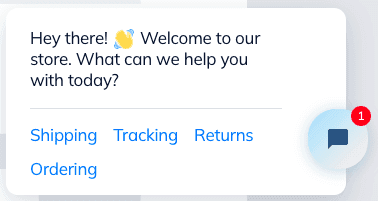
Depending on the option they choose, you can then lead them down a path with pre-defined responses, to hopefully answer their question (without the need for any manual intervention).

A chatbot for frequently asked questions

The chatbot’s responses
There are also options to use Tidio’s AI to detect the topic of a user’s question. This also allows you to take them down a conversation flow that you’ve designed.
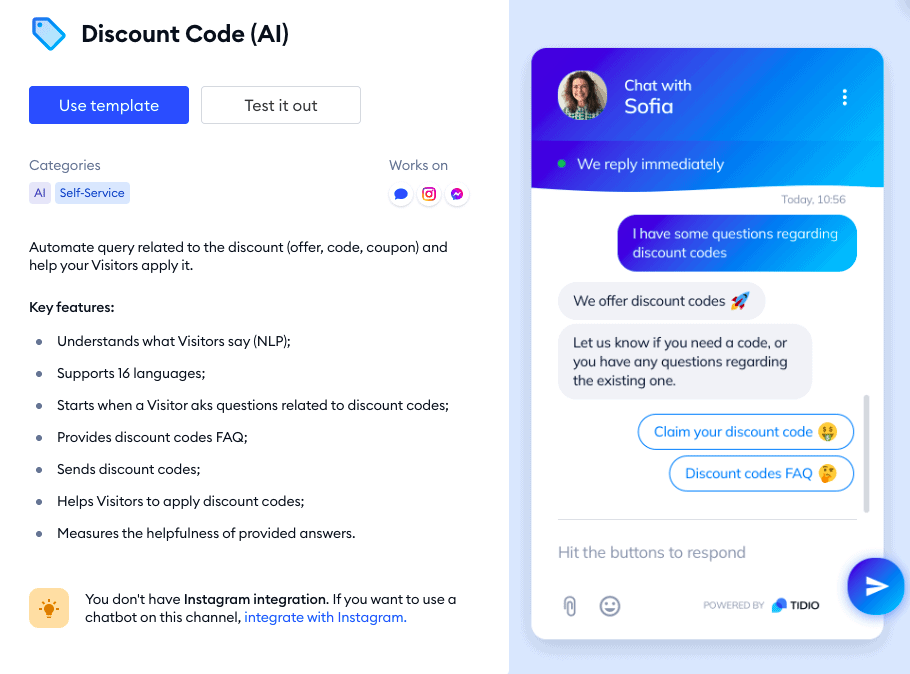
One of Tidio’s AI-powered chatbots
But, there are other solutions that take chatbots even further. These aim to simulate real, human conversations, with chatbots that can provide dynamic, intelligent responses. Tidio’s chatbots don’t provide this level of interaction, but solutions like Userlike and LiveChat’s ChatBot do, albeit at a much higher cost.
So, if you’re after AI-powered chatbots that really allow for human-like, two-way conversations, you’ll probably find Tidio’s range to be on the light side (here are a few good alternatives). For most small to mid-sized businesses however, we think Tidio’s chatbots do a great job of automating repetitive conversations.
Tidio Review: Conclusion
Dare we say it – Tidio makes live chat fun. We were really impressed by how modern everything looks, and by the clever features. The integrations with Shopify, Facebook and Instagram are also useful for online stores that sell across multiple channels.
Those who are familiar with email automation software will really get a kick out of Tidio’s workflow-based chatbot editor, which lets you send automated messages. It takes some getting used to, but we did find the templates to be a nice touch, especially for beginners.
Overall, Tidio feels like it’s better built for marketing and sales-related functions, rather than customer service. That’s reflected in the type of chatbots offered (26 lead-related chatbots vs 14 support related-related ones). So while Tidio offers some excellent tools to help small businesses generate leads, larger teams who field a lot of support requests may struggle with the lack of voice/video calling, and advanced team management features.
A wider range of integrations wouldn’t go amiss, either – particularly with key tools such as WhatsApp, Salesforce, and Apple Messages (which are all offered by what we feel is its strongest competitor, LiveChat).
In fact, for a similar price point ($19/user/month), Livechat offers a lot more in the way of ticketing, routing and team management features, as well as personal support. JivoChat is another similarly-priced competitor that provides better ticketing and integration features.
But, if automating communications is your priority, then Tidio is a small business tool that provides excellent value for money. We can confidently say it’s one of the best live chat software we’ve tested. And the free plan is simply the cherry on top.