4.5
Excellent
The Best
Speed
Uptime
The Worst
Visitor limits Starting
Only hosts WordPress
Starting From
$25 / month
WP Engine Review
We awarded WP Engine our Best Hosting Provider For WordPress badge for 2026!
Find out why in our extensive review of its product.
We’ve tested and reviewed dozens of web hosting services here at Tooltester. And guess which one we ended up using ourselves?
That’s right! This website is proudly hosted by WP Engine. I personally love that they are super reliable, secure, and come with great support.
But we’ll also be the firsts to admit they aren't for everyone. We also use DreamHost, SiteGround and Kinsta for other projects, and in fact, at one point, we strongly considered switching this site to Flywheel.
WP Engine Prices
The prices below are for WP Engine’s shared web hosting services. The monthly prices need to be paid in advance for a full year. They include a discount for annual prepay. If you want to pay monthly, expect it to be 20-30% higher.
There is also a custom service for enterprise clients with dedicated environments for high performance (the one we use) – you’ll need to talk to WP Engine directly about those.
And for a complete breakdown of their prices, you can check out our dedicated WP Engine pricing page.
Managed Hosting | StartUp | Professional | Growth | Scale |
|---|---|---|---|---|
Websites | 1 | 3 | 10 | 30 |
Visits per month * | 25,000 | 75,000 | 100,000 | 400,000 |
Support | 24/7 chat | 24/7 chat and phone | 24/7 chat and phone | 24/7 chat and phone |
Storage | 10GB | 15GB | 20GB | 50GB |
Bandwidth per month | 50GB | 125GB | 200GB | 500GB |
Free SSL | Yes | Yes | Yes | Yes |
External SSL Certificates | No | Yes | Yes | Yes |
SFTP accounts | Unlimited | Unlimited | Unlimited | Unlimited |
Database | Unlimited | Unlimited | Unlimited | Unlimited |
CDN | Yes | Yes | Yes | Yes |
Price** | $25/month | $49/month | $96/month | $242/month |
More details | ||||
* Please be aware that there can be discrepancies between how WP Engine counts visits and your web analytics tool does. You can jump down to the FAQ section at the end of this article to understand exactly why.
** Prices include the discount for annual plans (monthly plans are available too).
What can you expect from each WP Engine plan?
As you probably gathered from the table above, there are quite a few limitations with WP Engine plans, namely the number of sites you can host, monthly visitors, as well as storage and bandwidth. Still, individual plans do share some common attributes such as:
24/7 chat support (high quality too – I’ll go into more detail later)
Unlimited SFTP accounts along with SSH access
Dev and Stage environments for testing your site
Free WordPress themes from Studiopress
Global CDN and built-in caching system
Version control with Git integration
Automatic and manual backups
WordPress features like staging
Free 60-day cancellation
Now, this is where I would start looking at specific use cases:
Startup: This one would be great for a small website or blog. The only exception would be if you work with a lot of heavy video or audio files, as the 10GB might be too limiting for your needs.
Professional: as the name suggests, a good plan for a growing business, professional blog or ecommerce. It’s quite a leap from the Startup plan in terms of price and features. Some of the advanced tools like Multisite and Geotargeting become available (I’ll explain what they do in more detail below).
Growth: The main benefit, when compared to the Professional plan, is that you get to host 10 websites with that plan.
Scale: another big upgrade in terms of visitor numbers and price, at $242 per month. The features are pretty much the same as with the Growth plan, so it’s really about managing bandwidth for a big, popular site at this point.
Note: The prices above reference WP Engine’s Managed plans. It also offers Managed Plus, Ecommerce and Secure Hosting packages, which are the same basic plans but with some add-ons (e.g. plugin auto-updated).
WP Engine conclusion
WP Engine Backups
One of the great strengths of WP Engine is that they give you loads of options for backing up your website. First of all, you will get:
Automatic website backups before and after a restore, copy or deploy
Up to 40 automatic backup points monthly
Option to access up to the 60 last backups by contacting support.
You can also make manual backup checkpoints directly from your user portal.
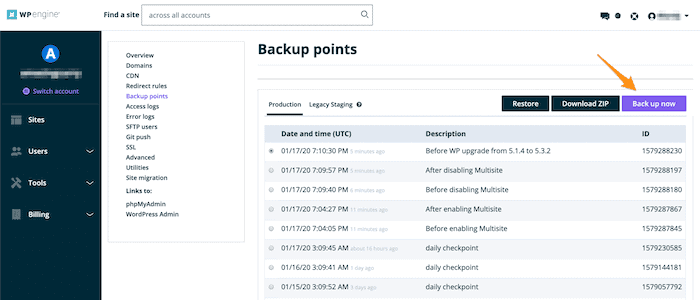
You can also see the Restore button on the same page. This also comes with neat options like the ability to send notifications via email to colleagues when the backup is finished. It can take from a few minutes to several hours.
It’s also possible to download backups manually as a ZIP file. All in all, a very easy and effective way to give yourself full peace of mind.
Finally, fans of source control will be pleased to hear that you can connect your WP Engine data to a Github account. It’s a fairly technical process involving SSH keys, but here again, their documentation is excellent.
Testing WP Engine’s hosting
As you can see in the chart below, WP Engine had a perfect 100% uptime in this year’s web host reliability tests. These tests align with our experience of their servers (hosting this website) – and their uptime policy too.
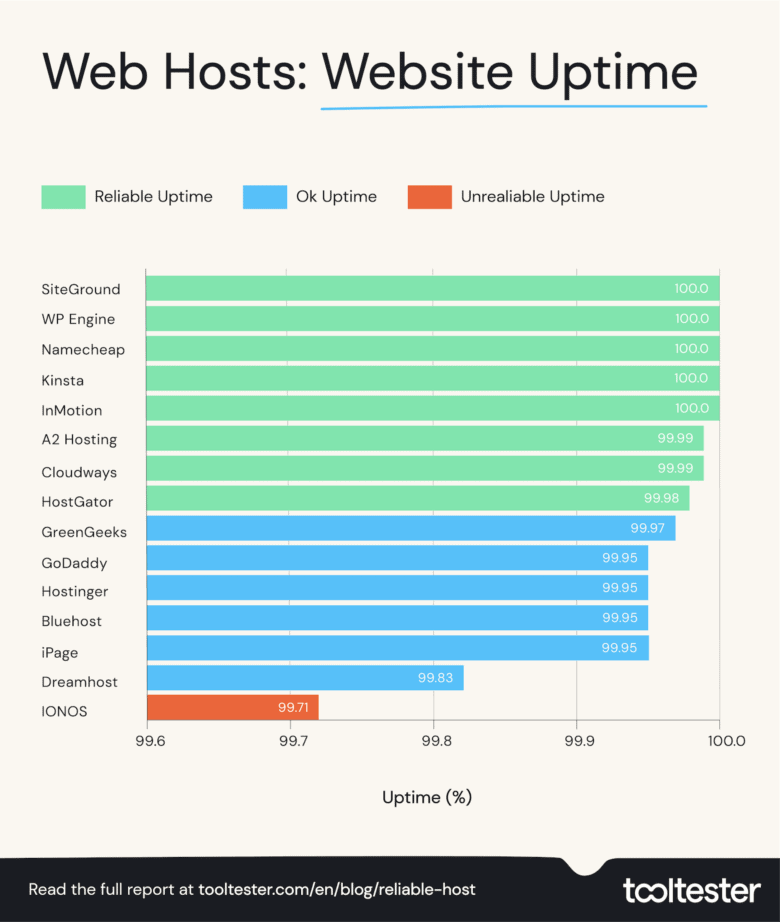
The table below shows WP Engine’s uptime over the last three years. Consistently impressive!
2020 | 2021 | 2022 | |
|---|---|---|---|
Uptime % | |||
99.97 | 100 | 100 | |
99.99 | 99.99 | 100 | |
– | 100 | 100 | |
100 | 100 | 100 | |
99.73 | 99.95 | 100 | |
99.99 | 99.98 | 99.99 | |
100 | 100 | 99.99 | |
99.91 | 99.99 | 99.98 | |
99.98 | 99.98 | 99.97 | |
99.90 | 99.96 | 99.95 | |
99.48 | 99.92 | 99.95 | |
99.96 | 99.99 | 99.95 | |
98.45 | 99.85 | 99.95 | |
99.99 | 99.96 | 99.83 | |
– | 99.93 | 99.71 | |
To monitor uptime I use StatusCake, a tool that checks each website every 5 minutes.
Is WP Engine fast?
Quite fast, it turns out. We tested four rounds of a test page for each provider, and you can see that WP Engine ranked pretty well and the results were not too far off GreenGeeks (the winner).
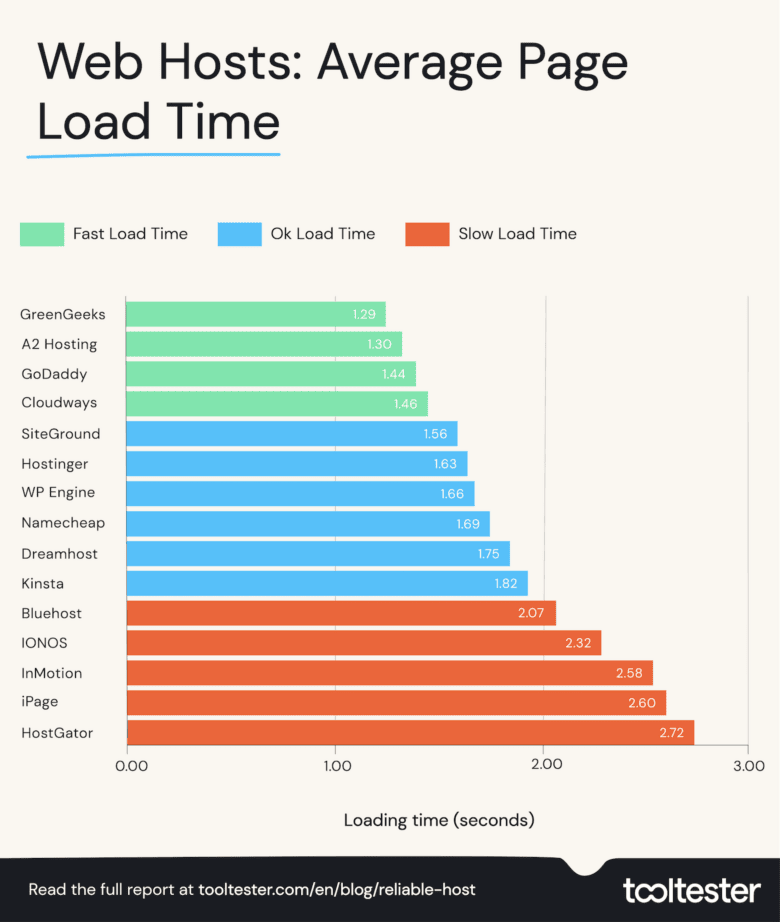
This has all kinds of advantages, and not just because it makes your users less likely to quit the site in frustration. Google likes fast sites, which helps your SEO, and can bring more traffic to your business.
And WP Engine has consistently been one of the fastest web hosts in our speed tests over the last three years, as you can see in the table below:
2020 | 2021 | 2022 | |
|---|---|---|---|
Page Load Time in Seconds | |||
2.39 | 1.56 | 1.29 | |
3.15 | 2.01 | 1.30 | |
3.40 | 1.94 | 1.44 | |
2.32 | 1.73 | 1.46 | |
2.14 | 1.54 | 1.56 | |
4.19 | 1.61 | 1.63 | |
2.21 | 1.65 | 1.66 | |
– | 1.60 | 1.69 | |
3.28 | 1.84 | 1.75 | |
2.98 | 1.77 | 1.82 | |
3.07 | 2.87 | 2.07 | |
– | 1.95 | 2.32 | |
4.36 | 2.75 | 2.58 | |
4.19 | 2.76 | 2.60 | |
3.77 | 2.78 | 2.72 | |
Results in seconds
While there are lots of things you can do to fix a slow website and make WordPress faster, using a fast web host is the most significant.
So these results are very reassuring!
WP Engine & WordPress
Because WP Engine only deals with WordPress sites, they have developed specific features and included special deals. This includes:
StudioPress Themes: you get to pick a free WordPress theme, usually worth $100-150.
The Genesis Framework: this is code that allows the StudioPress themes to be more efficient. No need to do anything, it’s running by default.
Auto upgrade of major releases and plugin updates: you won’t have to manually update your site any longer. While performing an update they also monitor if your site goes down. If so, they will immediately restore the previous version.
Geotargeting: you can enable their Geotarget feature (a paid add-on) which determines where the user is based, and delivers specific content to them.
Security: you get SSL certificates, malware scanning and cleaning, and activity logs to keep track of your account’s users, amongst others.
It’s also worth noting that their support team lives and breathes WordPress. You won’t have trouble explaining your problem because the CMS platform is the only one they focus on.
WP Engine and Staging Environments
Then, there’s the super helpful option to create different environments for your site. Essentially, it allows you to create a copy of your site to work on as a draft, and to test everything works before you publish it.
This is great for professional websites who can’t afford downtime and need to test a new plugin or CSS tweak, for instance.
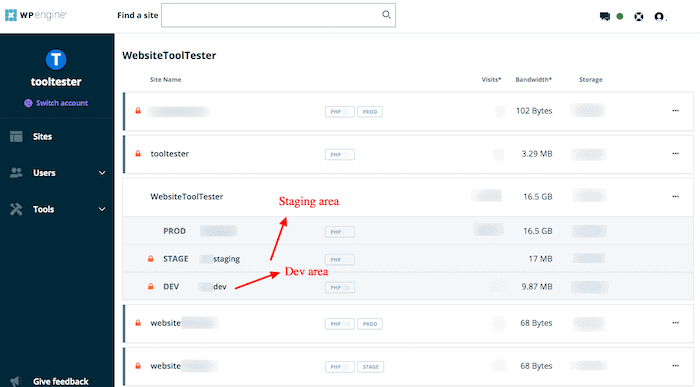
This feature is a must-have for professional WordPress sites, and I think a key reason to choose Wp Engine over a cheaper self-hosted provider.
Final WP Engine Review Comments
So what can we say about WP Engine in the end?
First and foremost, I can see how it may seem a bit pricey and limiting for certain users. If you don’t use WordPress, or if you’re worried about visitor limits, this probably isn’t a great deal.
In which case, check out a few of the low cost web hosts or some of the more affordable WordPress hosts that don’t have visitor limits.
But for professional WordPress sites, you really get your money’s worth in terms of support, backup features, and performance. To me, this is the holy trinity of must-haves when your website is also your business, and I’d be happy to recommend WP Engine.
Maybe one final comment as we’ve been with them for so many years: the thing I don’t love about them is that they’ve transformed into a bit of a salesy company. Expect them to ring you up. Not that this is ALWAYS a bad thing, I just find that many issues could have been dealt with more easily in an email. Of course, this is just my personal preference and may not even apply to you!
Now if you still need alternatives, here’s what I would recommend:
DreamHost is much more affordable, but doesn’t offer staging for the shared hosting plans
SiteGround doesn’t limit your bandwidth and traffic
Cloudways if you want a top-performing provider that allows more than just WordPress sites